
HTML6 Proposals Wishlist
Earlier this year, people started getting excited about some of the proposals for HTML6 that were being tossed around. While still far from becoming a reality, the W3C has been busy gathering ideas on their HTML/next page. Today’s article will highlight some of the more interesting ones. Just bear in mind that not every proposal will find its way to the final HTML6 spec.
ComboBox
It seems incredible that HTML still does not provide an editable SELECT – i.e. combobox. HTML5 brought us the Datalist element, but it’s really just a regular SELECT with autocompletion.
So how would it work? It could be as simple as adding an “editable” attribute. Setting it would add a textbox to the dropdown whose value would be sent to the server on form submits. Autocompletion could still be provided for values that match one or more options’ display text.
<select name="age" editable="editable">
  <option value="18">eighteen</option>
  <option value="19">nineteen</option>
  <option value="20">twenty</option>
  <option value="21">twenty-one</option>
</select>
Advanced Anchors
What with links being the cornerstone of the World-Wide-Web, they should be more powerful and versatile than they are currently. According to the contributor of the advanced anchors idea, “creating dynamic links to an exact location within a document seems fun,” so why not?
We could make hyperlinks more powerful by accepting CSS3 selectors within the href attribute. For example, here’s a link that points to the third paragraph of the second section within the same document:
<a href=":root div:nth-of-type(2) > p:nth-of-type(3)"> go to the 3rd paragraph </a>Location Element
Location aware applications have become so commonplace that it only seems natural that core HTML should have an element for storing location information. It would contain geolocation data such as latitude, longitude, and elevation/altitude. It could perhaps even point to a map service such as googlemaps via a href attribute:
<location lat="54.3" long="32" altitude="540" href="http://googlemaps.com/locationmap">My house</location>That’s the basic idea, but there could probably be a lot more done with it.
Automatic Capitalization in Text Fields
This idea was first submitted as a bug. There has since been an ongoing discussion of the issue. In the words of the author, the automatic capitalization of certain letters within a text field “is not a style transformation of the input like CSS’s ‘text-transform: capitalize’. It is a semantic description of the type of data that will be input into the field.”
More than binary “on” and “off” configuration, the presenter offers several other intriguing possibilities:
- “none” (“off”) – no capitals are expected
- “sentences” (“on”) – each sentence is expected to start with a capital
- “words” – each word is expected to be capitalized
- “characters” – all characters are expected to be capitalized
- omitted/missing attribute for form controls is a “default” state (“off”?)
- all unrecognized but present values fall back to “sentences” (“on”)
Here is how the above values could be utilized in a form:
<form>
  First Name: <input name="first-name" autocapitalize="words">
  Last Name: <input name="last-name" autocapitalize="words">
  State: <input name="state" autocapitalize="characters">
  Username: <input name="username" autocapitalize="none">
  Comment: <textarea name="comment" autocapitalize="sentences"></textarea>
</form>
Bring Back the Datagrid!
You may remember the datagrid from HTML5. It would up being removed from the spec due to disagreements over its final implementation, but the idea itself is a good one. Despite the migration of layouting duties from tables to CSS, the latter are still your best choice for displaying tabular data. However, plain vanilla tables have far too little behavior to really shine within modern web apps. Case in point, I am currently developing just such an application that displays product data within a table. I wound up using the jQuery Tablesorter plugin. Another option would have been the excellent jQuery DataTables plugin.
Some of the features that I was looking for that are not natively supported by HTML5 tables include:
- scrolling
- sorting
- responsiveness
- zebra stripes – that’s where rows alternate between two different colors
- infinite loading – where rows are populated as they scroll into view
- datasource binding
- in-place editing
- pagination
- filtering
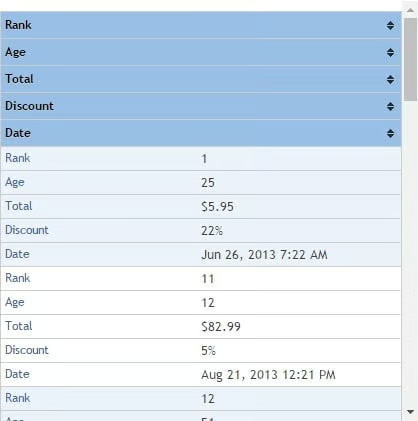
Don’t get me wrong; I am grateful to have these wonderful free plugins at my disposal. Nonetheless, it would be nice to have similar functionality available to me using native HTML.
Conclusion
So, there are some of the many interesting ideas for HTML6 floating around right now. I would urge you to tale a look at the HTML/next page for more proposals. If you’d like to contribute to the HTML Working Group, visit the WorkMode page for more information on how to join.
