


HTML lists are simple to use and very useful when you want to enumerate items. In this article, you will learn how to create different types of lists: unordered, ordered, nested lists, menu, drop-down lists, etc.
 Unordered HTML List
To use unordered lists in an HTML script you should use the <ul> tag; the <li> tag represents each of item list.
<ul>
  <li>phpbuilder.com</li>
  <li>devx.com</li>
  <li>htmlgoodies.com</li>
</ul>
You can also choose list item marker, by setting the CSS list-style-type property, such as disc (default), circle, square or none. In the example below, you will see different unordered marked lists:
<!DOCTYPE html>
<html>
<body>

<h4>Different unordered HTML lists</h4>

<ul>
  <li>phpbuilder.com</li>
  <li>devx.com</li>
  <li>htmlgoodies.com</li>
</ul>

<ul style="list-style-type:circle">
  <li>phpbuilder.com</li>
  <li>devx.com</li>
  <li>htmlgoodies.com</li>
</ul>

<ul style="list-style-type:square">
  <li>phpbuilder.com</li>
  <li>devx.com</li>
  <li>htmlgoodies.com</li>
</ul>

<ul style="list-style-type:none">
  <li>phpbuilder.com</li>
  <li>devx.com</li>
  <li>htmlgoodies.com</li>
</ul>

</body>
</html>
The output of the above code is:
Different unordered HTML lists
- phpbuilder.com
- devx.com
- htmlgoodies.com
- phpbuilder.com
- devx.com
- htmlgoodies.com
- phpbuilder.com
- devx.com
- htmlgoodies.com
- phpbuilder.com
- devx.com
- htmlgoodies.com
Ordered HTML List
To use unordered list in a HTML script you should use the <ol> tag; the <li> tag represents each of item list.
There are a few types of markers that can be used on the list items:
<!DOCTYPE html>
<html>

<body>

<h4>Different ordered HTML lists</h4>

<ol>
  <li>phpbuilder.com</li>
  <li>devx.com</li>
  <li>htmlgoodies.com</li>
</ol>

<ol start="3">
  <li>phpbuilder.com</li>
  <li>devx.com</li>
  <li>htmlgoodies.com</li>
</ol>

<ol start="4" reversed>
  <li>phpbuilder.com</li>
  <li>devx.com</li>
  <li>htmlgoodies.com</li>
</ol>

<ol type="a">
  <li>phpbuilder.com</li>
  <li>devx.com</li>
  <li>htmlgoodies.com</li>
</ol>

<ol type="A">
  <li>phpbuilder.com</li>
  <li>devx.com</li>
  <li>htmlgoodies.com</li>
</ol>

<ol type="i">
  <li>phpbuilder.com</li>
  <li>devx.com</li>
  <li>htmlgoodies.com</li>
</ol>

<ol type="I">
  <li>phpbuilder.com</li>
  <li>devx.com</li>
  <li>htmlgoodies.com</li>
</ol>

</body>
</html>The output of the above code is:
Different ordered HTML lists
- phpbuilder.com
- devx.com
- htmlgoodies.com
- phpbuilder.com
- devx.com
- htmlgoodies.com
- phpbuilder.com
- devx.com
- htmlgoodies.com
- phpbuilder.com
- devx.com
- htmlgoodies.com
- phpbuilder.com
- devx.com
- htmlgoodies.com
- phpbuilder.com
- devx.com
- htmlgoodies.com
- phpbuilder.com
- devx.com
- htmlgoodies.com
Using a Custom Bullet Image
The list-style-image property allows you to use a custom image for your bullet.
list-style-image: url('arrow.gif');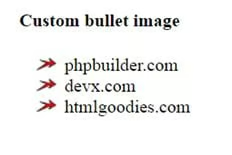
<!DOCTYPE html>
<html>

<head>

<style type="text/css">

  li {

    list-style-image: url('arrow.gif');
  }
  </style>

</head>

<body>

<h4>Different ordered HTML lists</h4>

<ol>
  <li>phpbuilder.com</li>
  <li>devx.com</li>
  <li>htmlgoodies.com</li>
</ol>

</body>
</html>
HTML Description Lists
HTML also supports description lists; a description list is a list of terms that contains a description of each term. To define a description list you should use the <dl> tag, the <dt> tag defines the term (name), and the <dd> tag is used for description of each term, as you will see in the below example:
<!DOCTYPE html>
<html>
<body>

<h4>Description HTML list</h4>

<dl>
  <dt>HTML Goodies</dt>
  <dd>- HTML 5</dd>
  <dd>- HTML & GRAPHICS TUTORIAL</dd>
  <dd>- Beyond HTML </dd>
  <dt>PHPbuilder</dt>
  <dd>- ARCHITECTURE</dd>
  <dd>- DATABASES</dd>
  <dd>- FUNCTIONS</dd>
  <dd>- TOOLS</dd>
</dl>

</body>
</html>
Description HTML list
HTML Goodies
– HTML 5
– HTML & GRAPHICS TUTORIAL
– Beyond HTML
PHPbuilder
– ARCHITECTURE
– DATABASES
– FUNCTIONS
– TOOLS
Nested HTML Lists
In the sample of code below, you will see an example of nested lists:
<!DOCTYPE html>
<html>
<body>

<h4>Nested HTML lists</h4>

<ul>
  <li>HTML Goodies</li>
    <ul>
     <li>HTML 5</li>
  	 <li>HTML & GRAPHICS TUTORIAL</li>
     <li>Beyond HTML </li>
    </ul>
  <li>PHPbuilder
    <ul>
      <li>ARCHITECTURE</li>
      <li>DATABASES</li>
      <li>FUNCTIONS</li>
      <li>TOOLS</li>
    </ul>
  </li>
  <li>Devx</li>
    <ul>
      <li>.NET</li>
      <li>JAVA</li>
      <li>C++</li>
      <li>Mobile</li>
    </ul>
</ul>

</body>
</html>
Nested HTML lists
- HTML Goodies
- HTML 5
- HTML & GRAPHICS TUTORIAL
- Beyond HTML
- PHPbuilder
- ARCHITECTURE
- DATABASES
- FUNCTIONS
- TOOLS
- Devx
- .NET
- JAVA
- C++
- Mobile
Horizontal Lists
Creating a menu is a popular way to style a horizontal HTML list, as you may see in the next example:
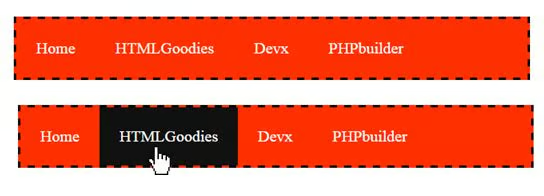
<!DOCTYPE html>
<html>
<head>
<style>
ul {
    list-style-type: none;
    margin: 0;
    padding: 0;
    overflow: hidden;
    background-color: #ff3000;
    border-style: dashed;
}

li {
    float: left;
}

li a {
    display: block;
    color: white;
    text-align: right;
    padding: 20px;
    text-decoration: none;
}

li a:hover {
    background-color: #111111;
}
</style>
</head>
<body>

<ul>
  <li><a href="#home">Home</a></li>
  <li><a href="#HTMLGoodies">HTMLGoodies</a></li>
  <li><a href="#Devx">Devx</a></li>
  <li><a href="#PHPbuilder">PHPbuilder</a></li>
</ul>

</body>
</html>
HTML <select> Tag
The <select> tag is used to create a drop-down list. We also need the <option> tags inside the <select> element to define the available options in the list.
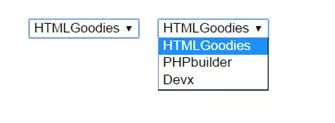
<!DOCTYPE html>
<html>
<body>

<select name="websites">
  <option value="HTMLGoodies">HTMLGoodies</option>
  <option value="PHPbuilder">PHPbuilder</option>
  <option value="Devx">Devx</option>
</select>

</body>
</html>
Attributes
- autofocus — specifies that the drop-down list should automatically get focus when the page loads
- disabled — specifies that a drop-down list should be disabled
- form — defines one or more forms the select field belongs to
- multiple — specifies that multiple options can be selected at once
- name — defines a name for the drop-down list
- required — specifies that the user is required to select a value before submitting the form
- size — defines the number of visible options in a drop-down list
The <option> tag defines an option in a select list and may be a part of the <select> or <datalist> element.
Attributes
- disabled — specifies that an option should be disabled
- selected — specifies that an option should be pre-selected when the page loads
- label — specifies a shorter label for an option
- value — specifies the value to be sent to a server
HTML <datalist> Tag
The <datalist> tag is new in HTML5 and specifies a list of pre-defined options for an <input> element. Users will see a drop-down list of pre-defined options as they input data and provide an auto-completion feature on the <input> elements.
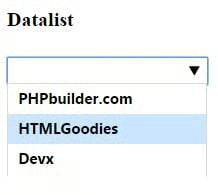
An <input> element with pre-defined values in a <datalist>:
<!DOCTYPE html>
<html>
<body>

<h4>Datalist</h4>

<input list="websites">

<datalist id="websites">
  <option value="PHPbuilder.com">
  <option value="HTMLGoodies">
  <option value="Devx">
</datalist>

</body>
</html>
Conclusion
This article has provided a few examples of different types of HTML lists.
