
Top HTML5 Features: DOCTYPE, FIGURE, and Form Enhancements
It’s been a couple of years now since HTML5 was released as a stable W3C Recommendation, in October of 2014, and we now have the opportunity to look back and reflect on how HTML5 has changed the way we code and present web content. Today’s article presents a review the original goals of the HTML5 specification as well as some of its most successful and notable improvements, particularly to the DOCTYPE, FIGURE, and INPUT fields.
Goals of HTML5
One of the major goals of the HTML5 specification was to solve the compatibility issues that affected the existing HTML4 standard, so as to provide better cross-platform support and to ensure that content is displayed properly on a variety of devices, from desktop computer, laptop, tablet, to smartphone. But there was a lot more to it than that. Other goals were to:
- deliver rich content – such as graphics and videos – to the client without the need for additional plugins (i.e. Flash and Silverlight)
- provide better semantic support for web page structure through the introduction of new structural element tags
- provide a stricter parsing standard to simplify error handling, and to simplify backward compatibility with documents written to older standards
To achieve all that, many new features were introduced in HTML5, including:
- improved support for embedding graphics, audio, and video content using the new <canvas>, <audio>, and <video> tags
- multi-threading via Web workers
- new extensions to the JavaScript API such as geolocation
- new drag-and-drop functionality
- local storage and caching features
- many new semantic tags and new form controls to complement the structural logic of modern web applications
The rest of this article highlights the new HTML5 DOCTYPE, FIGURE, and INPUT field features.
Simplified DOCTYPE TAG
In HTML 4.01, the <!DOCTYPE> declaration referred to a DTD, because HTML 4.01 was based on SGML. The DTD specified the rules for the markup language, so that the browsers render the content correctly. There were a number of variations including HTML 4.01 Strict, HTML 4.01 Transitional, HTML 4.01 Frameset, XHTML 1.0 Strict, XHTML 1.0 Transitional, XHTML 1.0 Frameset, and XHTML 1.1. HTML5 did away with all of that and replaced them with the succinct <!DOCTYPE html>.
HTML 4.01 Transitional:
<!DOCTYPE HTML PUBLIC "-//W3C//DTD HTML 4.01 Transitional//EN" "http://www.w3.org/TR/html4/loose.dtd">

HTML5:
<!DOCTYPE html>Easy Image Captions
Recall that one of the main goals for HTML5 was improved semantics. Before HTML5, there was no simple or semantic way to associate the caption with its image element. HTML5 introduced the <figure> and <figcaption> elements to solve this problem. By combining both these elements, you can semantically integrate captions with their images.
<figure>
    <img src="path/to/image" alt="About image" />
    <figcaption>
        <p>The image caption. </p>
    </figcaption>
</figure>
Form Enhancements
I thought that I’d give form enhancements their own section because these are particularly near and dear to my heart. Placeholders, field validation, data formatting, tabbing order, and error handling have all been addressed in HTML5.
Textbox Placeholders
Prior to HTML5, you had to use JavaScript to put a placeholder in a textbox. No more; the placeholder attribute sets a value to display in the textbox until the field receives the focus. Moreover, if the user deletes the value and navigates away, it will once again reappear. Here’s an example:
<input name="userName" type="text" placeholder="Enter your name" />Try it out for yourself!
New Email, URL, and Telephone Input Types
The ubiquitous input element has been further overloaded to include three new types: email, url, and telephone. We’ll concentrate on the email type here, but you can read all about the new input types in my article entitled HTML5 Forms: How To Use The New Email, URL, and Telephone Input Types.
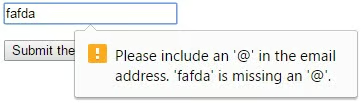
<input name="email" type="email" placeholder="you@youremail.com" />Enter a value in the field below and submit the form. An invalid email address should trigger a message similar to the following:
New and Improved Tabbing
In HTML4, the tabindex attribute was limited to those elements that could receive focus, i.e. form elements. In HTML5, tabindex became a document-level attribute, enabling any element to receive tab focus. That means that even paragraphs, images, and spans may now receive focus. Here’s a demo:
<input tabindex="3" placeholder="Will receive focus third"><br />
<input tabindex="-1" placeholder="Won't receive focus at all">    <br />
<input tabindex="2" placeholder="Will receive focus second"><br />
<input tabindex="1" placeholder="Will receive focus first">
<p tabindex="4"> This wouldn't normally receive focus</p>
Set the focus here to begin and press the TAB
key to navigate from one field to the next.
This wouldn’t normally receive focus
Conclusion
HTML5 has brought us so many improvements that it’s difficult to cover all of them in one article. Therefore, expect a follow-up soon!
