
Top 3 Obsolete HTML5 Features
It’s been over two years now since HTML5 became a W3C Recommendation (in October of 2014). Since then, browser vendors have been quick to adopt its new features just as developers were quick to take advantage of them. Those same developers may have to revisit their work, as the W3C has removed a few features from the spec, effectively rendering them obsolete. In today’s article, we’ll take a look at three such features and offer alternatives (where applicable) that will accomplish the same objective.
Obsolete Does Not Mean “Deprecated”
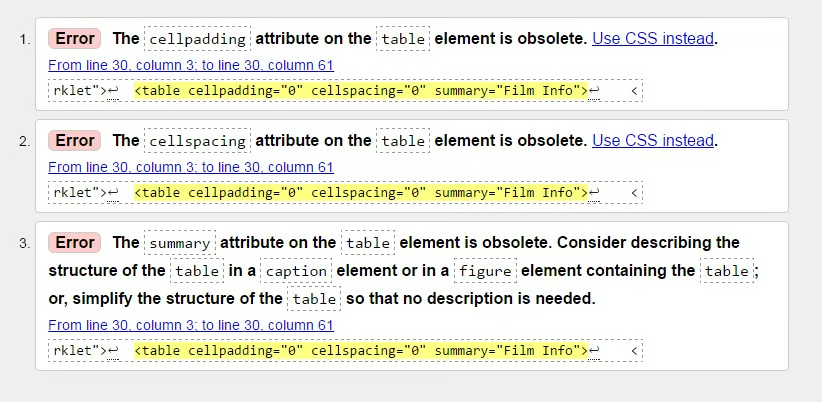
In previous versions of HTML, the term “deprecated” was used to describe elements and attributes that were no longer valid or that were no longer part of the current HTML spec. However, the HTML5 specification updated the terminology so that a feature that was deprecated in HTML 4.01 would now be obsolete in HTML5. Officially, obsolete elements and attributes are those that will trigger warnings in conformance checkers. Examples of obsolete features include the border attribute on a table or IMG element. Although browsers may continue to support them going forward, it is best to avoid using obsolete elements or attributes.
If ever you have some doubt as to a feature’s validity, you can always run your markup through the W3C’s Markup Validation Service. It’s an online tool that, in addition to producing a report of syntax errors, also highlights obsolete elements and attributes:
The HGROUP Element
As you may have guessed, the HGROUP element was meant to group one or more H1-H6 elements together – typically a title and accompanying subtitle. It was aimed at document outlining algorithms, so that all but the highest level heading in the group would be omitted from the resulting document outline. Here’s how you would use it:
<article>
   <hgroup>
      <h1>DR. STRANGELOVE</h1>
      <h2>HOW I LEARNED TO STOP WORRYING AND LOVE THE BOMB</h2>
   </hgroup>
   <p>In 1964, with the Cuban Missile Crisis fresh in viewers' minds...</p>
</article>
Seems like a good idea, but, in April 2013, it was removed from the W3C’s specification.
If you want to add a subtitle, one recommendation from the spec is to use a SPAN tag. You can then style it using CSS.
<article>
   <hgroup>
      <h1>DR. STRANGELOVE
        <span>HOW I LEARNED TO STOP WORRYING AND LOVE THE BOMB</span>
      </h1>
   </hgroup>
   <p>In 1964, with the Cuban Missile Crisis fresh in viewers' minds...</p>
</article>The CENTER Element
Anyone with more than a year’s experience in web design knows exactly what the CENTER element does: it horizontally centers all its content within its containing element. I have always found it especially useful for centering headings and tables. In HTML 4, it was deprecated in favor of CSS’s text-align property, in order to keep presentational elements out of the HTML markup. In HTML5, the CENTER element’s presentational – i.e non-semantic – purpose made it obsolete.
This development did not sit well with a lot of proponents of the humble CENTER tag. Seeing as it works so well, who cares whether it contributes to the document’s semantic structure or not? One reason that visual elements must be kept separate from semantic ones is that people who use screen readers depend on a document’s semantic structure to navigate its contents. Too much non-semantic HTML can cause them to get lost very quickly. Don’t believe me, try a screen reader like JAWS yourself.
The SCOPED Attribute
The SCOPED attribute was specific to the STYLE element and acted as a boolean switch: when present, it specified that the styles will only be applied to the STYLE block’s container element and child elements, as opposed to the entire document. Here’s an example:
<div>
  <style scoped>
    h1 {color:red;}
    p {color:blue;}
  </style>
  <h1>This heading should be red</h1>
  <p>This paragraph should be blue.</p>
</div>
The idea was to make the content portable, so that you could take an entire chunk of HTML out of the document and paste it in a new one. This would benefit syndicated content because everything would be self-contained. Perhaps the issue with the SCOPED attribute is that it violates the principle of separation of concerns, which aims to keep the structure, style, and behavior separate.
It isn’t totally dead in the water just yet, as Firefox still supports it, but it’s days are definitely numbered.
Conclusion
Once a feature becomes obsolete, can it ever hope to return? It sure can! Exhibit 1: the TIME element. It was removed from the spec only to be reinstated a little later on with more features! Maybe we should just leave our markup alone in the hopes that other obsolete features might make a comeback? While nothing is impossible, the more likely possibility is that your obsolete elements will cease to work as browser vendors drop support for them. The choice is yours. As the old knight said in the Last Crusade, “choose wisely!”
