


If you’re a regular reader of my articles, you probably noticed that I am an avid proponent of unit testing. With regards to JavaScript, my preferred tool is the Jasmine JavaScript testing framework. Over time, it’s been enhanced with many additional libraries. One that I’ve been making use of is jasmine-jquery by Wojciech Zawistowski, a.k.a. “velesin.” It provides a set of custom jQuery matchers for DOM elements as well as a versatile fixture loader. I’ve written previously about testing DOM elements in the Testing DOM Events Using jQuery and Jasmine 2.0 article. Today, I’ll be elaborating on the topic by tackling a few challenges such as anonymous event handlers and asynchronous calls.
The Test Case
Over the years I’ve come to realize that certain coding conventions lend themselves to testing more readily than others. Ironically, while JS libraries like jQuery make coding event handlers a lot easier, the common practice of binding event handlers as anonymous functions is not doing developers any favors when it comes time to test their functionality. Should you be tasked with writing unit tests for such code, don’t despair; where there’s a will, there’s a way!
Here’s an abridged version of a massive HTML page with everything contained within the document, from styles, scripts, and the form fields that we’d like to test:
<!DOCTYPE html>
<html class="wp-toolbar" lang="en-US" >
  <head>
    <link rel="stylesheet" href="//code.jquery.com/ui/1.12.1/themes/base/jquery-ui.css">
    <script src="https://code.jquery.com/jquery-1.12.4.js"></script>
    <script src="https://code.jquery.com/ui/1.12.1/jquery-ui.js"></script>
  </head>
  <body>
    <form>
      <p><button class="button button-primary" id="btnSaveTop" type="button">Save</button></p>
      <p id="my-admin-message-top"></p>
      <h2>Carluccio's</h2>
      <h3>Sheffield Meadowhall</h3>
      <div id="1520_1">
        <label for="menu_name_1520_1">Menu Name: </label>
        <input name="menu_name_1520_1" id="menu_name_1520_1" type="text" value="Menu 1">
        <button type="button" data-location="1520_1">Delete</button><br>
        <label for="menu_url_1520_1">Source URL: </label>
        <input name="menu_url_1520_1" id="menu_url_1520_1" type="url" value="http://menuurl.com/menu.pdf">
      </div>
      <h3>Sheffield Ecclesall Road</h3>
      <div id="5411_1"></div>
      <div id="5411_2"></div>
      <div id="5411_3"></div>
      <! -- etc… -- >
      <p><button id="btnAddNewMenu" type="button">Add New Menu</button></p>
      <div class="add-new-menu">
      <! -- new menu fields… -- >
      </div>
    </form>
    <script>
      //see next code snippet
    </script>
  </body>
</html>It’s an admin page for managing menus. Notice that it references the jQuery and jQuery-ui libraries and contains a script below the form to which the code pertains.
This is the full form upon loading:
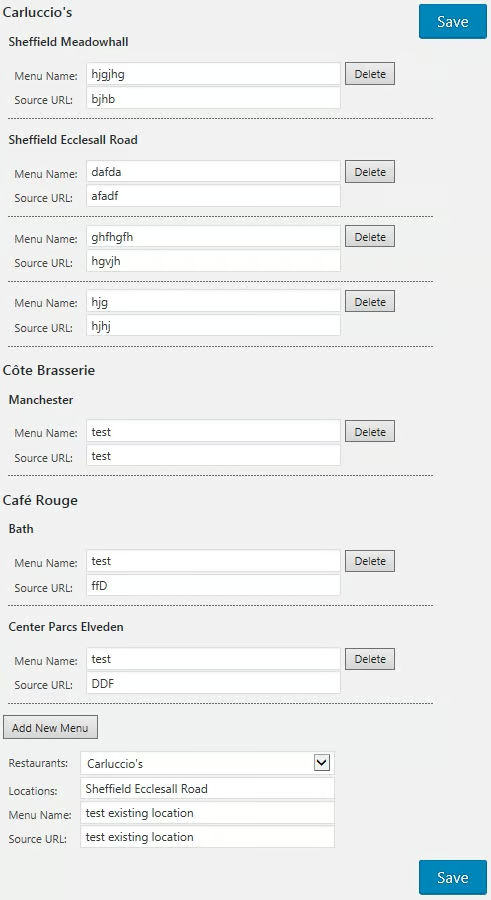
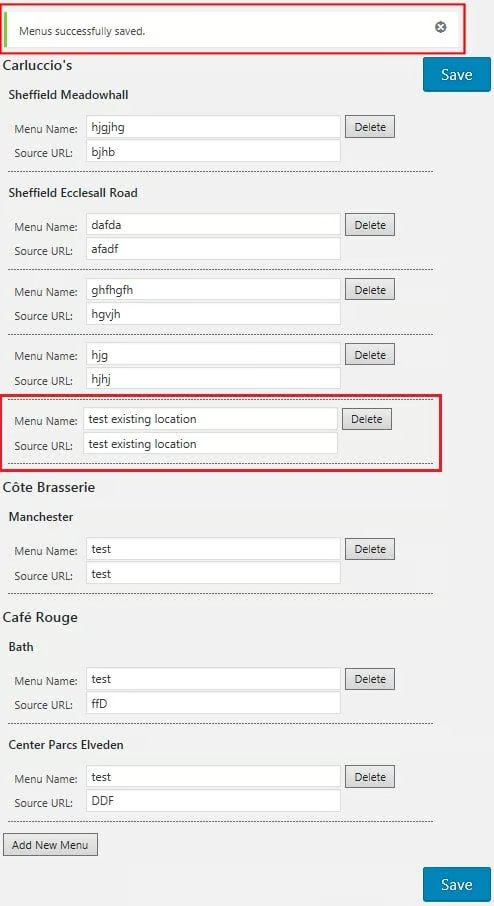
After the page is saved, the new menu name and URL fields under the “Add New Menu” should be appended to the menus under the “Carluccio’s – Sheffield Ecclessal Road” location:
The Save Button Handler Code
Should be easy enough to test; invoke the button click and then check for the new fields. The first part is easy, however, waiting for the form to be updated presents some challenges. Here’s the relevant code:
jQuery(function($) {
  $('button[type="button"][id^="btnSave"]').click(function(evt) {
    console.log('In save button click.');

    $.ajax({
      url : ajaxUrl,
      method: 'POST',
      success: function( data ){
        window.console.log( data );

        displayAdminMessage(data, color, which);

        $('form:first')
          .find('div.add-new-menu input[name^="menu_name_"]')
            .each(function() {
          //move the new menus to the top section of the form
        });
      }
    });
  });
});
The main stumbling blocks are:
- The test code and HTML are all part of one file.
- The button click handler is contained within the anonymous jQuery ready() function.
- The button click handler is itself an anonymous function.
- The menu fields aren’t moved until the Ajax call invokes the success handler.
- Not surprisingly, the code that moves the fields is also an anonymous function!
You might be tempted to just throw your hands in the air and say “why bother testing?” But don’t.
Setting up the Spec Runner
As mentioned above, the flavor of jasmine that we’ll be using is jasmine-jquery. It works as an add-on to the jasmine scripts so you should reference it last in your SCRIPT imports after the three core jasmine files and jquery. I find that the easiest way to load the libraries is to fetch them from their respective CDNs (Content Delivery Networks):
<!DOCTYPE HTML>
<html>
<head>
  <meta http-equiv="Content-Type" content="text/html; charset=UTF-8">
  <title>A Simple jasmine-jquery Demo</title>

  <link rel="shortcut icon" type="image/png" href="jasmine_favicon.png">
  <link rel="stylesheet" type="text/css" href="https://cdnjs.cloudflare.com/ajax/libs/jasmine/2.8.0/jasmine.css">

  <script src="https://cdnjs.cloudflare.com/ajax/libs/jasmine/2.8.0/jasmine.js"></script>
  <script src="https://cdnjs.cloudflare.com/ajax/libs/jasmine/2.8.0/jasmine-html.js"></script>
  <script src="https://cdnjs.cloudflare.com/ajax/libs/jasmine/2.8.0/boot.min.js"></script>
  <script src="https://cdnjs.cloudflare.com/ajax/libs/jquery/3.2.1/jquery.js"></script>
  <script src="https://bowercdn.net/c/jasmine-jquery-2.1.1/lib/jasmine-jquery.js"></script>
<! -- ... -- >Conclusion
Now that we’ve got all of the necessary libraries in place, we’re ready to set up our fixtures and write our tests. We’ll cover those next. In the meantime, I’ve put together a simple demo on Codepen for you to gain a better understanding of how the jasmine-jquery library works.
