
With the latest release of CSS3 has come a lot of power. In this article we look at several quick styling methods you can use to create CSS3 effects. Before we begin, here is a cheat sheet which lists the various functions you can do with CSS3.
Generally, I recommend making use of programs that have built CSS3 into their interface, but for this article we will look at several CSS3 coding snippets which you can use with your layouts.
Prior to the latest CSS updates, if you wanted certain special effects you would have to create those in image manipulation or illustration programs and then bring the finished result into your layout.
CSS3 has made many of those obsolete and allows you to create special effects using code. Some examples where you can do this are with images, rounded corners, image layer effects, shadowed text, buttons, and gradients. We will look at a few of those here.
Images
With images there are several ways you can use them, by positioning, sizing, repeating, etc. Here is some code:
<style>
body
{
background:url(blue_square.gif);
background-repeat:no-repeat;
}
</style>
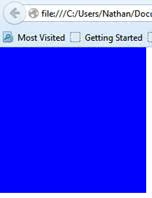
Note that in this code, there’s no mention of the image size, so it will appear as is when rendered in your browser.
If you want to change that, you can do so by pixel size or by percentage:
background-size:120px 50px;
or
background-size:85% 55%;
One of the things you’ll notice in the above code is the no-repeat property, which will bring up only one image in your browser. If you want the image to tile across the screen the code would read something like this:
<style>
body
{
background: url(red_circle.gif);
background-repeat: repeat-x;
}
</style>
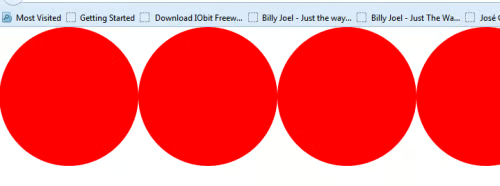
And here is the result.
If you want several individual images to appear, one after the other, the code would look like this:
<!DOCTYPE HTML PUBLIC “-//W3C//DTD HTML 4.01 Transitional//EN” “http://www.w3.org/TR/html4/loose.dtd”>
<html>
<head>
<title> New Document </title>
</head>
<body>
<style>
.three_horiz {
display: block;
min-width: 350px;
padding: 0;
}
.three_horiz img {
float: left;
margin: 0;
padding: 0;
}
</style>
<div class=”three_horiz“>
<img src=”blue_square.gif” />
<img src=”red_circle.gif” />
<img src=”yellow_star.gif” />
</div>
</body>
</html>
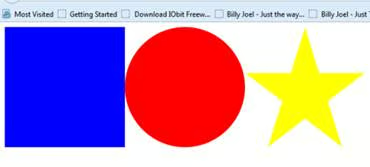
Here is the result.
Now we will go one step further and create a layered image with the above shapes. In this case, we set a number to each element (z-index). The way this works is that elements with higher numbers will overlap elements with a lower number. Here is the code:
<!DOCTYPE HTML PUBLIC “-//W3C//DTD HTML 4.01 Transitional//EN” “http://www.w3.org/TR/html4/loose.dtd”>
<html>
<head>
<title> New Document </title>
</head>
<body>
<style>
#blue_square {
position: absolute;
left: 25px;
top: 25px;
z-index: 1;
}
#red_circle {
position: absolute;
left: 125px;
top: 25px;
z-index: 2;
}
#green_star {
position: absolute;
left: 225px;
top: 25px;
z-index: 3;
}
</style>
<div id=”blue_square“><img src=”blue_square2.png” /></div>
<div id=”red_circle“><img src=”red_circle2.png” /></div>
<div id=”green_star“><img src=”green_star2.png” /></div>
</body>
</html>
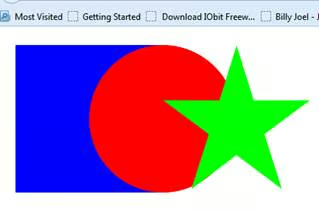
Here is the layered image.
The last effect we will do is to add transparency to the images with the opacity element. In this case I have applied opacity to the red circle and the green start. The blue square is a solid color. Here is the code:
<!DOCTYPE HTML PUBLIC “-//W3C//DTD HTML 4.01 Transitional//EN” “http://www.w3.org/TR/html4/loose.dtd”>
<html>
<head>
<title> New Document </title>
</head>
<body>
<style>
#blue_square {
position: absolute;
left: 25px;
top: 25px;
z-index: 1;
}
#red_circle {
position: absolute;
left: 125px;
top: 25px;
z-index: 2;
opacity:0.8;
}
#green_star {
position: absolute;
left: 225px;
top: 25px;
z-index: 3;
opacity:0.6;
}
</style>
<div id=”blue_square“><img src=”blue_square2.png” /></div>
<div id=”red_circle“><img src=”red_circle2.png” /></div>
<div id=”green_star“><img src=”green_star2.png” /></div>
</body>
</html>
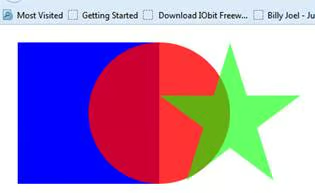
And the final result.
CSS3 Borders
Formerly an effect you would need to create in program like Photoshop, rounded corners can be quickly created using CSS3 only. Here is a simple example:
<!doctype html>
<html>
<head>
<meta charset=”utf-8″>
<title>Untitled Document</title>
<style>
div
{
border:2px dashed blue;
padding:20px 20px;
background:#eeeeee;
width:200px;
border-radius:10px;
}
</style>
<body>
<div>Here is a simple example of the border-radius property in action.</div>
</body>
</html>
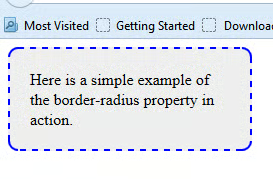
This is the result. Of course, you can do much more than this, including changing the color of each side of the box individually, changing the radius for each corner or adding a drop shadow to the entire box. Here is the code to add a color to each side of the box:
<!doctype html>
<html>
<head>
<meta charset=”utf-8″>
<title>Untitled Document</title>
<style>
div
{
border:2px solid blue;
padding:20px 20px;
background:#eeeeee;
width:200px;
border-radius:25px;
border-top-color:#FF0000;
border-bottom-color:#00FF00;
border-left-color:#00FFFF;
border-right-color:#FF00FF;
}
</style>
<body>
<div>Here is a simple example of the border-radius property in action.</div>
</body>
</html>
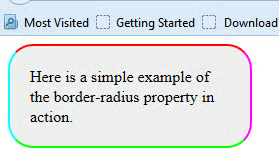
And the result.
Here’s the code for the colored sides and for a different radius for each corner:
<!doctype html>
<html>
<head>
<meta charset=”utf-8″>
<title>Untitled Document</title>
<style>
div
{
border:2px solid blue;
padding:20px 20px;
background:#eeeeee;
width:200px;
border-top-color:#FF0000;
border-bottom-color:#00FF00;
border-left-color:#00FFFF;
border-right-color:#FF00FF;
border-top-left-radius:10px;
border-bottom-left-radius:20px;
border-top-right-radius:30px;
border-bottom-right-radius:10px;
}
</style>
<body>
<div>Here is a simple example of the border-radius property in action.</div>
</body>
</html>
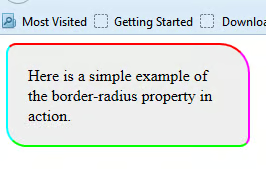
And the final image.
Now, here is the code for the above image using the box-shadow property.
<!doctype html>
<html>
<head>
<meta charset=”utf-8″>
<title>Untitled Document</title>
<style>
div
{
border:2px solid blue;
padding:20px 20px;
background:#eeeeee;
width:200px;
border-top-color:#FF0000;
border-bottom-color:#00FF00;
border-left-color:#00FFFF;
border-right-color:#FF00FF;
border-top-left-radius:10px;
border-bottom-left-radius:20px;
border-top-right-radius:30px;
border-bottom-right-radius:10px;
box-shadow: 15px 15px 8px #333333;
}
</style>
<body>
<div>Here is a simple example of the border-radius property in action.</div>
</body>
</html>
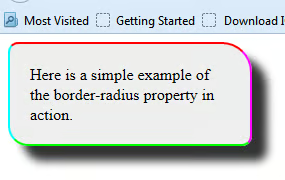
And the final result.
Conclusion
As you can see, CSS3 offers many different styling options. In the next article we will look at buttons, gradients and a few software programs to make your life easier and speed up your workflow.
