


Introduction
Web applications frequently have to indicate progress to users to visibly communicate that some processing is going on. Prior to HTML5, web developers had to write custom controls to indicate progress. There was no uniformity in how web authors went about indicating progress. Sensing a requirement to bring uniformity, HTML5 specification introduced a new markup element “progress” for representing the completion progress of a task.
The HTML5 specification says…
The HTML5 specification defines the “progress” element as an element which represents the completion progress of a task.
Source: http://dev.w3.org/html5/markup/progress.html#progress
The DOM interface for “progress” element is
interface HTMLProgressElement : HTMLElement { attribute double value; attribute double max; readonly attribute double position; readonly attribute NodeList labels;};
The “progress” element can be used in one or more of the following scenarios:
- Indicating progress of a current task.
- Indicating progress of a period of inactivity by the user, which can lead to session abandonment.
The “progress” markup element is a type of phrasing content element. Any phrasing element can be the parent of a “progress” markup element, and all global attributes are permitted.
In addition to global attributes, “progress” markup element supports the following default display properties:
- Value – which specifies how much of a task has been completed. The value can be any non-negative floating-point number.
- Max: which specifies how much work the task requires in total. The value can be any non-negative floating-point number.
Constraints which apply to “progress” markup element
· The Progress markup element, while incredibly useful, does have some constraints to its use. Those contraints are as follows:
- A progress element cannot appear as a descendant of another progress element.
- The value of value attribute cannot exceed the value of max attribute, when specified. If the max attribute is not specified, the value of value attribute cannot exceed 1.
- Unlike a few other phrasing content element, a progress element must have both a start and end tag.
Hands On
Let us look at the source code of a simple HTML5 page which shows the “progress” element.
<!DOCTYPE html>
<html>
<meta charset=”utf-8″>
<title>Progress element sample</title>
<body>
<article>
<header>
<h1>Progress element sample</h1>
<p>Demo showing progress element in HTML5</p>
</header>
<progress id=”progress1″ max=”100″ value=”30″></progress>
<br />
<progress id=”progress2″ value=”0.9″></progress>
<footer>
<h1></h1>
<p>HTML Goodies</p>
</footer>
</article>
</body>
</html>
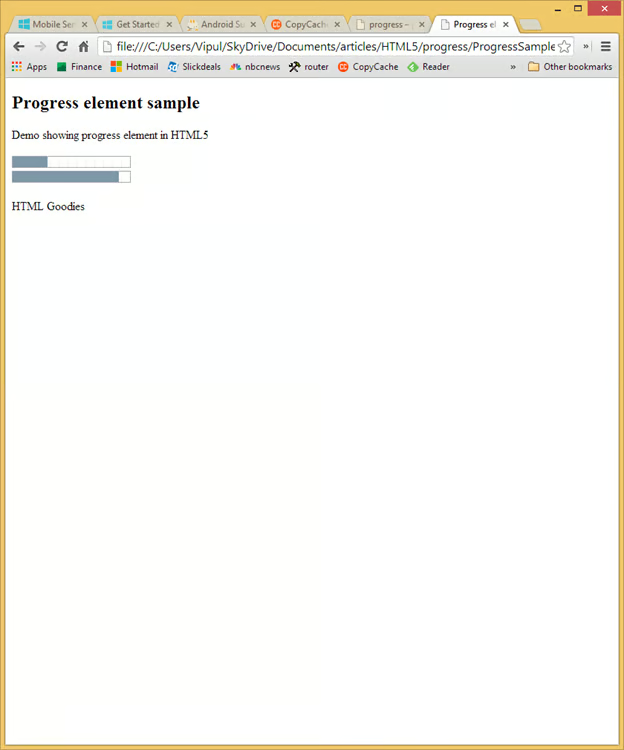
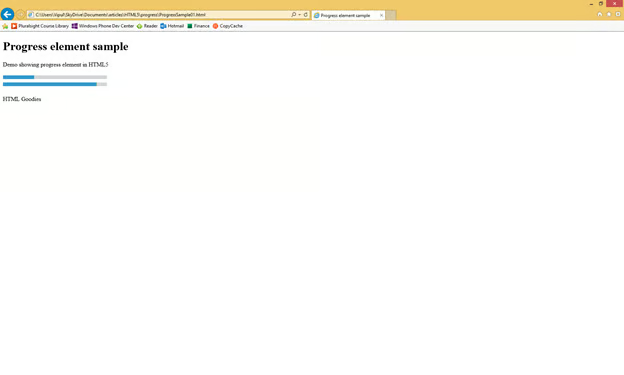
When the above code is rendered in a browser which understand HTML5 (latest versions of browsers do), you will notice the “progress” element.
Here is how it looks in Chrome:
In Internet Explorer 11, it is rendered as below:
Summary
In this article, we learned how to use the progress markup element in HTML5 web pages. I hope you have found this information useful.
About the author
Vipul Patel is a Program Manager currently working at Amazon Corporation. He has formerly worked at Microsoft in the Lync team and in the .NET team (in the Base Class libraries and the Debugging and Profiling team). He can be reached at vipul.patel@hotmail.com
