
The W3C HTML5 specification introduces numerous new tags to define semantic/structural elements, text-formatting instructions, form controls, input types, and more. This page describes all of the new HTML5 tags along with updates to an existing tag.
New Semantic/Structural Elements
HTML5 offers new semantic elements to define different parts of a web page:
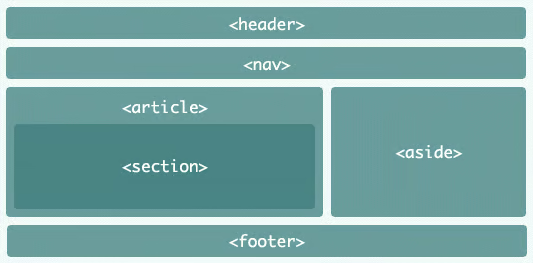
<article>
A self-contained composition in a document that is independently distributable or reusable, e.g. a forum post, a magazine or newspaper article, or blog entry.
<aside>
Defines content tangentially related to the content surrounding it, such as related reading links and glossaries, which may or not be nested within an article element.
<figcaption>
Defines a caption for a <figure> element
<figure>
Used in conjunction with the <figcaption> element to mark up diagrams, illustrations, photos, and code listings, etc.
<header>
Not be confused with the <head> element, the <header> tag typically contains the section?s heading (an h1?h6 element), as well as other content, such as a navigation links, table of contents, a search form, or any relevant logos.
<footer>
For content located at the very bottom of the web page or nearest section. A footer typically contains information about its section such as who wrote it, links to related documents, copyright data, etc. It in turn may contain entire sections, with appendices, indexes, license agreements, and other similar content.
<main>
Delineates the main content of the body of a document or web app. As such, the main content area holds content that is directly related to or expands upon the central topic of the page. Moreover, it helps screen readers and other assistive technologies understand where the main page content begins.
<mark>
Meant to bring the reader?s attention to a part of the text due to its contextual relevance.
<nav>
Denotes a section with navigation links, either to other pages or to parts within the same page.
<section>
Unlike the <div> tag, which is used for a myriad of purposes, not the least of which is formatting content, the <section> element demarcates a thematic grouping of content. Each section typically includes a heading element and associated content within DIVs and Paragraphs. Examples include introduction, blog entries, and contact information.
<details>
Produces an expandable box to display additional information. The expanding/collapsing behaviour does not depend on scripting, so it should work even if JavaScript is disabled or not supported.
<summary>
An optional element that summarizes the contents of the parent details element. As such, it may contain a description, caption, or legend.
<time>
Contains both human-friendly contents, along with a machine-readable form of those contents in the datetime attribute. The kinds of content range from various kinds of dates, to times, time-zone offsets, and durations.
Text-level Elements
<bdi>
Defines a part of text that might be formatted in a different direction from other text
<wbr>
Defines a possible line-break in text that is written as one long word.
New Form Elements
HTML5 introduces a number of new input types, attributes, and other elements to the HTML language.
<datalist>
Defines pre-defined options for input controls. It works in a similar way to an autocomplete textbox.
<keygen>
Defines a key-pair generator field (for forms). When the control’s form is submitted, the private key is stored in the local keystore, and the public key is packaged and sent to the server.
<output>
Defines the result of a calculation
<progress>
Presents a progress bar that tracks the progress of a task.
New Input Types
HTML5 introduced a number of new input types for forms to address specific behavioral and formatting requirements that were lacking for the HTML 4.01 spec. For instance, handling the inputting of dates, numbers, telephone numbers, etc.
| New Input Types | New Input Attributes |
|---|---|
|
|
More Relaxed Attribute Syntax
In HTML5, attribute values may be delimited by single or double quotes or, in the case of single word entries, without either. Attributes without a value (such as disabled) don’t require an equals or quotes (=””).
Graphic Elements
Defines graphic drawing using JavaScript Defines graphic drawing using SVG
See the following article for more information on the HTML5 canvas element and this article for more on the HTML5 svg element.
Media Elements
As the Internet becomes a more immersive multi-media experience, browsers are now equipped to handle many media types without the need for additional plugins. A prime example is the <embed> element that has to an explosion in YouTube video sharing.
<audio>
Defines sound or music content
<embed>
Defines containers for external applications (usually a video player)
<source>
Defines sources for <video> and <audio>
<track>
Defines tracks for <video> and <audio>
<video>
Defines video or movie content
The HTML5 <!DOCTYPE> Declaration
The <!DOCTYPE> declaration is not an HTML tag per se, but rather an instruction to the web browser about what version of HTML the page is written in. In HTML 4.01, the <!DOCTYPE> declaration referred to a DTD, because HTML 4.01 was based on SGML. Since HTML5 is no longer based on SGML, Web documents do not require a reference to a DTD. The <!DOCTYPE> declaration must be on the very first line of your HTML document, before the opening <HTML> tag.
The following table compares some previous HTML 4.01 <!DOCTYPE> declarations to HTML5’s single replacement:
| HTML 4.01 | HTML5 |
|---|---|
| <!DOCTYPE HTML PUBLIC “-//W3C//DTD HTML 4.01 Transitional//EN”> <!DOCTYPE html PUBLIC “-//W3C//DTD XHTML 1.0 Strict//EN” “http://www.w3.org/TR/xhtml1/DTD/xhtml1-strict.dtd”> | <!DOCTYPE HTML> |
