


written by Jennifer Marsman
There’s no question, HTML5 is a hot topic for developers. If you need a crash course to quickly understand the fundamentals of HTML5’s functionality, you’re in the right place.
In this tutorial, I’ll cover the new semantic markup, canvas for drawing and animation, audio and video support, and how to use HTML5 with older browsers. Might be a bit more than five minutes, but I promise I’ll keep it quick. Stick with me…it’ll be worth it!
Semantic Markup and Page Layout
There’s a great story about a university who, when building their campus, didn’t create any walking paths. They just planted grass and waited.
A year later, the grass was all worn out where people walked most frequently. So that’s where the university paved the actual sidewalks.
It makes perfect sense! The sidewalks were exactly where people actually walked.
The HTML5 new semantic elements were based on that exact same logic (see the W3C design guidance to “Pave the Cowpaths”).
Semantic elements describe their meaning or purpose clearly to the browser and to the developer. Contrast that with (for example) the <div> tag. The <div> tag defines a division or a section in an HTML document, but it doesn’t tell us anything about its content or convey any clear meaning.
<div>
Developers commonly use IDs and/or class names with these <div> tags. This conveys more meaning to the developers, but unfortunately, it doesn’t help browsers derive the purpose of that markup.
<div id=”header”>
In HTML5, there are new semantically rich elements that can convey the purpose of the element to both developers and browsers.
<header>
The W3C mined billions of existing webpages to discover the IDs and class names that developers were already using. Once they threw out div1, div2, etc., they came up with a list of rich descriptive elements that were already being used, and made those the standards.
Here are a few of the new semantic elements in HTML5:
- article
- aside
- figcaption
- figure
- footer
- header
- hgroup
- mark
- nav
- section
- time
Because of the semantic richness, you can probably guess what most of these elements do. But just in case, here’s a visualisation:
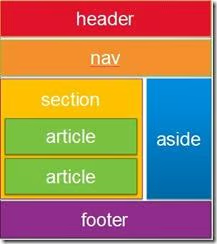
Headers and footers are self-explanatory and nav creates a navigation or menu bar. You can use sections and articles to group your content. Finally, the aside element can be used for secondary content, for example, as a sidebar of related links.
Here is a simple example of some code that uses these elements.
<!DOCTYPE html>
<html>
<head>
    <meta charset="utf-8" />
    <title>Title</title>
    <link href="css/html5reset.css" rel="stylesheet" />
    <link href="css/style.css" rel="stylesheet" />
</head>
<body>
    <header>
        <hgroup>
            <h1>Header in h1</h1>
            <h2>Subheader in h2</h2>
        </hgroup>
    </header>
    <nav>
        <ul>
            <li><a href="#">Menu Option 1</a></li>
            <li><a href="#">Menu Option 2</a></li>
            <li><a href="#">Menu Option 3</a></li>
        </ul>
    </nav>
    <section>
        <article>
            <header>
                <h1>Article #1</h1>
            </header>
            <section>
                This is the first article.  This is <mark>highlighted</mark>.
            </section>
        </article>
        <article>
            <header>
                <h1>Article #2</h1>
            </header>
            <section>
                This is the second article.  These articles could be blog posts, etc.
            </section>
        </article>
    </section>
    <aside>
        <section>
            <h1>Links</h1>
            <ul>
                <li><a href="#">Link 1</a></li>
                <li><a href="#">Link 2</a></li>
                <li><a href="#">Link 3</a></li>
            </ul>
        </section>
        <figure>
            <img width="85" height="85"
                src="http://www.windowsdevbootcamp.com/Images/JennMar.jpg"
                alt="Jennifer Marsman" />
            <figcaption>Jennifer Marsman</figcaption>
        </figure>
    </aside>
    <footer>Footer - Copyright 2011</footer>
</body>
</html>
I should call out a few other new elements in this code…
Did you notice the hgroup element, which grouped together my h1 and h2 headers?
The mark element allowed me to highlight or mark some important text. Finally, the figure and figcaption elements specify a figure in my content (like an image, diagram, photo, code snippet, etc.) and let me associate a caption with that figure, respectively.
Here’s what that webpage would look like when combined with some CSS. (NOTE: I borrowed this CSS from my talented teammate Brandon Satrom’s TechEd talk, but the less-than-beautiful end effect was all me.)
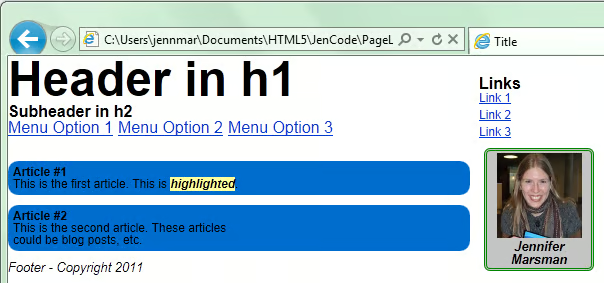
Now, imagine this in the hands of someone actually good at CSS (which I am not). The result is pretty powerful. The descriptiveness of the HTML makes it super easy to work with.
Finally, if you’re trying to follow along in Visual Studio but you’re seeing squiggly lines everywhere that VS doesn’t understand the HTML5 elements, make sure you have Visual Studio 2010 SP1 installed.
Then, in the Visual Studio menu, go to Tools, Options. In the left-hand navigation pane, expand Text Editor, HTML, and then click Validation. From the Target dropdown menu, select HTML5. This will give you HTML5 IntelliSense support. Whew!
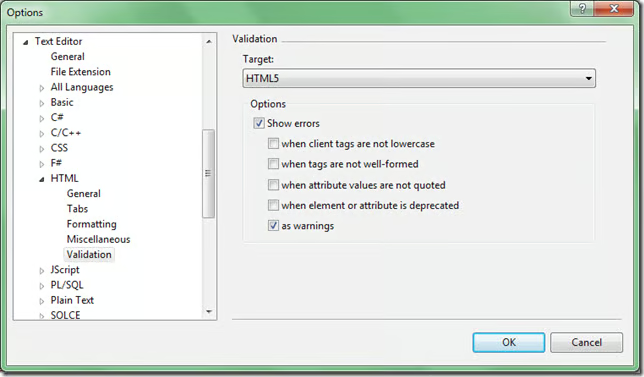
To dive deeper into semantic elements, check out:
- How to Enable HTMl5 Standards Support
- Semantics section of the W3C HTML5 specification
- Dive into HTML5 chapter on semantics entitled “What Does It All Mean?”
