


There are times when you want to modify an element on a web page dynamically. While there are a number of ways to do this with JavaScript, one of the quickest ways to get an element is by using the getElementById() method found within the document object model.
The getElementById() method does exactly what its name suggests; it gets an element based on its ID. As such, for it to work on your page, you must include an ID on the element you want to find. IDs should be applied uniquely to elements on a page, thus there should not be more than one result returned when this method is used.
Consider the simple HTML page shown in Listing 1.
Listing 1: A simple HTML Page
<html>
<body>
<h1 id="myH1">The Title on my Page!</h1>
<p>How now brown cow. Cow brown, now how.
   How now brown cow. Cow brown, now how.
   How now brown cow. Cow brown, now how. </p>

<p id="myQuote"><strong>My Quote Text is Here</strong></p>

<p id="myText">How now brown cow. Cow brown, now how.
   How now brown cow. Cow brown, now how. </p>
<p> </p>
<button type="button">Get a Quote</button>
<button type="button">Update Title</button>
</body>
</html>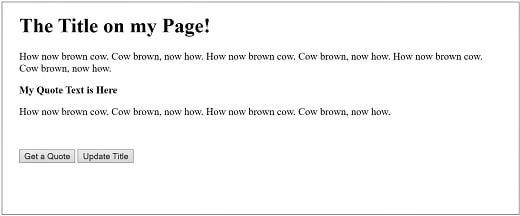
This web page shows two paragraphs of text with a quote between. There are also two buttons at the bottom of the page that will be used to manipulate the text. It is to note that there are IDs included on several elements.
As mentioned, using the getElementById, you can access any item on a web page that has an ID. In Listing 1, you can use getElementById to access the H1 element with the ID myH1, the second paragraph with the ID myQuote, and the third paragraph with id myText.
Because this method is part of the document object model, to access any of the items, you would use the script
document.getElementById('[id]');For example, to access the h1 element that has the ID of myH1, you’d use:
document.getElementById('myH1');Listing 2 is an update of Listing 1 with JavaScript added. The script will change the quote as well as the H1 text on the page when a button is clicked.
Listing 2: A simple HTML Page using getElementById()
<html>
<head>
<script type="text/javascript">

  function SetMyQuoteClick()
  {
      var SelectedItem = document.getElementById('myQuote');
      SelectedItem.style.color = 'Green';
      SelectedItem.textContent = "My New Quote";
  }
  function SetMyTitleClick()
  {
      var SelectedItem = document.getElementById('myH1');
      SelectedItem.textContent = "A new title....";
  }
</script>
</head>

<body>
<h1 id="myH1">The Title on my Page!</h1>
<p>How now brown cow. Cow brown, now how.
   How now brown cow. Cow brown, now how.
   How now brown cow. Cow brown, now how. </p>

<p id="myQuote"><strong>My Quote Text is Here</strong></p>

<p id="myText">How now brown cow. Cow brown, now how.
   How now brown cow. Cow brown, now how. </p>
<p> </p>
<button type="button" onclick="SetMyQuoteClick()">
   Get a Quote</button>
<button type="button" onclick="SetMyTitleClick()">
   Update Title</button>
</body>
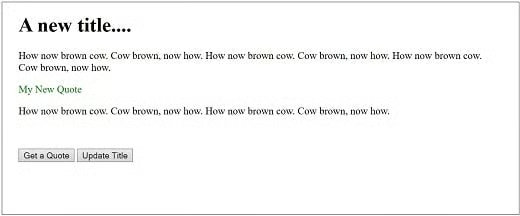
</html>You can see in Listing 2 that a variable is used to store the element returned from the call to document.getElementById. This variable, SelectedItem, can then be used to make modifications to the page. For the quoted text with id “myQuote,” the JavaScript is used to change to a new quote, as well as to modify the color to green. For the H1 tag, there is a simple replacement of the text.
Output from initially loading this page was shown earlier. You can see the results of clicking both buttons in the following figure:
There are other options that can be used to get elements on a page. Using getELementById is fast and efficient. It also gives you the control of knowing exactly what you are getting because you are targeting a specific ID rather than a tag, element type or other feature.
