


Introduction
There are quite a few popular websites that users frequently visit to perform certain calculations. Classic examples are bank websites which allow the user to calculate their monthly car loan installment or monthly credit card repayment amount. For all such calculations, users provide one or more inputs, which are then used to perform a calculation which is then presented to the user.
Classically web pages used to present the result in an input element.
With HTML5, web authors have an option to use a new element called the output markup element which was specially created to support displaying calculation results.
The HTML5 specification says…
The HTML5 specification defines the “output” element as an element which represents the result of a calculation.
Source: http://dev.w3.org/html5/markup/output.html#output
The DOM interface for “output” element is
interface HTMLOutputElement : HTMLElement { [PutForwards=value] readonly attribute DOMSettableTokenList htmlFor; readonly attribute HTMLFormElement? form; attribute DOMString name; readonly attribute DOMString type; attribute DOMString defaultValue; attribute DOMString value; readonly attribute boolean willValidate; readonly attribute ValidityState validity; readonly attribute DOMString validationMessage; boolean checkValidity(); void setCustomValidity(DOMString error); readonly attribute NodeList labels;};
The “output” element can be used in one or more of the following scenarios:
- Indicating output of a calculation based on number of inputs.
- Indicating current mouse pointer or touch location of the user session.
–
The “output” markup element is a type of phrasing content element. Any phrasing element can be the parent of a “output” markup element, and all global attributes are permitted.
In addition to global attributes, “output” markup element supports the following default display properties:
- Name – which represents the text identifier for the element.
- Form – which contains the value of the id attribute on the form with which the element is associated.
- For – which contains a list of elements on which the calculation has been performed for which the output element is rendering the result.
The typical default display properties are:
output {
display: inline; }
output {
unicode-bidi: –webkit-isolate; }
Constraints which apply to “output” markup element
· Unlike a few other phrasing content element, an output element must have both a start and end tag.
Hands On
Let us look at the source code of a simple HTML5 page which shows the “output” element.
<!DOCTYPE html>
<html>
<meta charset=”utf-8″>
<title>Output element sample</title>
<body>
<article>
<header>
<h1>Output element sample</h1>
<p>Demo showing output element in HTML5</p>
</header>
<form onsubmit=”return false” oninput=” totalamount.value = Math.round(principal.value * (Math.pow((1 + interest.value / 100), period.value)) * 100) / 100;“>
Principal<input name=”principal” id=”principal” type=”number”>
<br />
Duration<input name=”period” id=”period” type=”number”>
<br />
Interest Rate<input name=”interest” id=”interest” type=”number”>
<br />
Total amount <output name=”totalamount“ id=”totalamount“ for=”principal period interest”></output>
</form>
<footer>
<h1></h1>
<p>HTML Goodies</p>
</footer>
</article>
</body>
</html>
The above code calculates the total amount with interest when the amount (principal), duration and interest of the loan are provided. It displays the result in the output element which is identified as ”Total Amount” in the web page.
When the above code is rendered in a browser which understand HTML5 (latest versions of browsers do), you will notice the “output” element gets populated/updated as soon as any of the three input fields get updated.
Here is how it looks in Chrome.
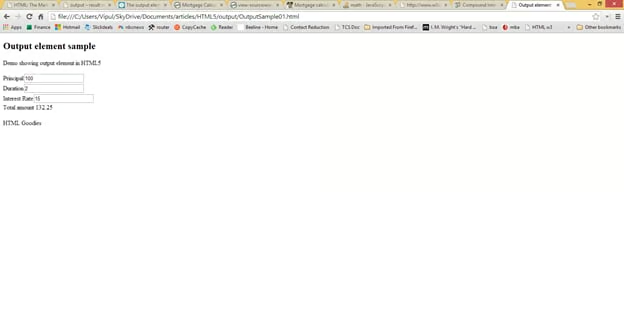
At the time of writing this article, the output element was not supported by other browsers like IE11.
You can see how the element displays in the browser just like a regular form element.
Summary
In this article, we learned how to use the progress markup element in HTML5 web pages. I hope you have found this information useful.
About the author
Vipul Patel is a Program Manager currently working at Amazon Corporation. He has formerly worked at Microsoft in the Lync team and in the .NET team (in the Base Class libraries and the Debugging and Profiling team). He can be reached at vipul.patel@hotmail.com
