


An Accordion control is one that can be expanded and contracted when it is clicked or selected. This functionality is named after the accordion instrument, which is expanded and contracted to play music. Accordion functionality on a web page allows a user to click on an item in a list to expand it for more details. Some accordion lists will allow for one item to be expanded at a time, others will allow you to expand or contract as many items as you’d like.
There are many ways to create an accordion list. In this article, you will see how to use a little bit of standard JavaScript to hide and display items in a list.
Collapsing an Unordered List
Ordered and unordered lists are great targets for expanding and contracting items. As an example, I’ve created an unordered list of books using the HTML UL tags. Within each book item is a list of details identified with list item (<LI>) tags. A tiny bit of additional formatting is also included as can be seen in Listing 1.
Listing 1. The basic HTML for a list of books
<LI><span><strong>Sams Teach Yourself C Programming in One Hour a Day, (7th Edition)
       </strong></span>
  <UL>
    <LI>Author: Bradley Jones</LI>
    <LI>Publisher: Sams Publishing</LI>
    <LI>Description: This is a description of a C programming book you
      can use to learn how to code!</LI>
   </UL>
</LI>
<LI><span><strong>Windows Live Essentials</strong></span>
  <UL>
    <LI>Author: Bradley Jones</LI>
    <LI>Publisher: Sams Publishing</LI>
    <LI>Description: This is a book covering some of the side programs included with some
              older versions of Windows.</p>
   </UL>
</LI>
<LI><span><strong>Sams Teach Yourself C++ in One Hour a Day</strong></span>
  <UL>
    <LI>Author: Bradley Jones</LI>
    <LI>Publisher: Sams Publishing</LI>
    <LI>Description: This is a C++ book that has lots of interesting things within its covers.</LI>
  </UL>
</LI>
Within this listing, I’ve also included span tags around the titles. In the JavaScript code that will be presented, these span tags will be used to identify the items that will be collapsed. The code that will be used, starts by getting the span elements within the page:
var allSpan = document.getElementsByTagName('span');The code will then create a function an onclick function for each of the elements:
for(var x = 0; x < allSpan.length; x++)
{
    allSpan[x].onclick=function()
    {
        // code to collapse or expand element….
    }
}
The piece left is the code necessary to do the collapsing or expanding. This can be done by checking to see if the span tag was an element that had child elements within it:
if(this.parentNode)IIf the element is a parent node, then each of the child elements within the parent node that will be collapsed need to be grabbed. This can be done with another call to getElementsByTagName. In the case of the book list, it is LI elements that will be collapsed.
if(this.parentNode)
        {
            var childList = this.parentNode.getElementsByTagName('LI');
With the LI items identified and put into the childList, the next step is to loop through each child element in the list and change whether they are displayed (expanded) or hidden (collapsed). This is done by toggling the display style on the element from “block” to “none” or vice-versa:
for(var y = 0; y< childList.length;y++)
{
    var currentState = childList[y].style.display;
    if(currentState=="none")
    {
        childList[y].style.display="block";
    }
    else
    {
        childList[y].style.display="none";
    }
}
When you put all of the pieces of the script together, it is important that it be called after the elements within the HTML file. Listing 2 shows the final script along with the HTML list presented previously. While this example uses the script embedded within the listing, good coding practice would have you place the code in a separate file that is included.
Listing 2: The final listing with collapsible book items
<!doctype html>
<head><title>Accordion Example</title></head><body>

<h2>Book List</h2>

<LI><span><strong>Sams Teach Yourself C Programming in One Hour
      a Day, (7th Edition)</strong></span>
  <UL>
    <LI>Author: Bradley Jones</LI>
    <LI>Publisher: Sams Publishing</LI>
    <LI>Description: This is a description of a C programming book you
      can use to learn how to code!</LI>
   </UL>
</LI>
<LI><span><strong>Windows Live Essentials</strong></span>
  <UL>
    <LI>Author: Bradley Jones</LI>
    <LI>Publisher: Sams Publishing</LI>
    <LI>Description: This is a book covering some of the side programs
          included with some older versions of Windows.</p>
   </UL>
</LI>
<LI><span><strong>Sams Teach Yourself C++ in One Hour a Day</strong></span>
  <UL>
    <LI>Author: Bradley Jones</LI>
    <LI>Publisher: Sams Publishing</LI>
    <LI>Description: This is a C++ book that has lots of interesting things
           within its covers.</LI>
  </UL>
</LI>

<script type="text/javascript">
var allSpan = document.getElementsByTagName('span');

for(var x = 0; x < allSpan.length; x++)
{
    allSpan[x].onclick=function()
    {
        if(this.parentNode)
        {
            var childList = this.parentNode.getElementsByTagName('LI');
            for(var y = 0; y< childList.length;y++)
            {
                var currentState = childList[y].style.display;
                if(currentState=="none")
                {
                    childList[y].style.display="block";
                }
                else
                {
                    childList[y].style.display="none";
                }
            }
        }
    }
}
</script>
</body>
</html>Figure 1 shows the rendered code. In the first window, the list is expanded. In the second, a couple of the titles have been clicked.
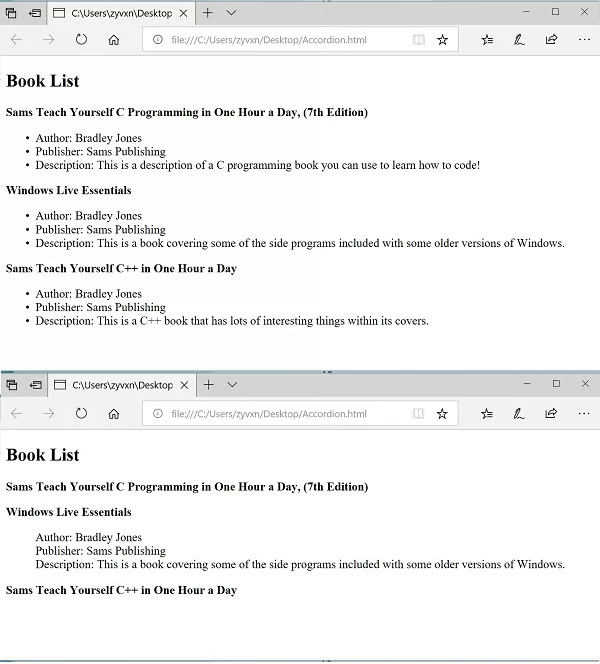
Figure 1: The rendered code.
Conclusion
As the code in this article illustrated, using just HTML and JavaScript, you can expand and contract items on a web page when the user clicks on them. You can start using the code in this article today. If you want more advanced functionality using accordion style functionality, then there are better options than standard JavaScript that will allow you to do even more with less code. This would include using JScript and many of the JavaScript frameworks.
