


Security is an important part of web applications. A lot of applications rely on public key/private keys model. To support such scenarios, HTML5 introduces a new markup element, “keygen” markup which represents a control for generating a public-private key pair. It also submits the public key from that key pair.
The HTML5 specification says …
The DOM interface for the keygen markup element is:
interface HTMLKeygenElement : HTMLElement { attribute boolean autofocus; attribute DOMString challenge; attribute boolean disabled; readonly attribute HTMLFormElement? form; attribute DOMString keytype; attribute DOMString name; readonly attribute DOMString type; readonly attribute boolean willValidate; readonly attribute ValidityState validity; readonly attribute DOMString validationMessage; boolean checkValidity(); void setCustomValidity(DOMString error); readonly attribute NodeList labels;};
The HTML5 specification for keygen markup element http://dev.w3.org/html5/markup/keygen.html mentions that there are no permitted contents for the control. However, the keygen markup element does indeed support several attributes.
· All global attributes are supported by the keygen markup element.
- The “challenge” attribute accepts string values which represent the challenge string.
- The “keytype” attribute accepts a value “rsa”.
- The “autofocus” attribute can be empty, or a value of “autofocus”.
- The “name” attribute.
- The “disabled” attribute specified whether the keygen markup element represents a disabled control.
·
The “keygen” markup element is a type of form element. However, it cannot appear as a descendent of an “a” element or a “button” element. Also, since it is a void element, the element must not have an end tag (despite having a start tag).
Hands On
Here is a simple example of keygen markup element.
<!DOCTYPE html>
<html>
<meta charset=”utf-8″>
<title>Keygen sample</title>
<body>
<article>
<header>
<h1>Keygen sample</h1>
<p>Demo showing keygen markup element</p>
</header>
<footer>
<h1></h1>
<p>HTML Goodies</p>
</footer>
</article>
<form action=”test.asp” method=”get”>
Phrase to encrypt: <input type=”text” name=”phrase”>
Encryption: <keygen name=”security”>
<input type=”submit”>
</form>
</body>
</html>
When the page is rendered in a modern browser (Latest version of Firefox, Chrome support keygen control), you will notice as under
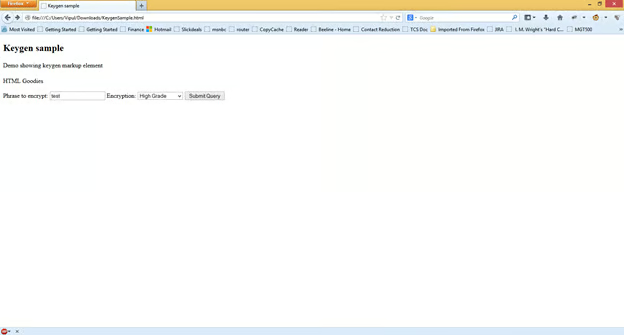
When the “Submit Query” button is clicked, the key is generated and the public key is passed to the form as a parameter.
Example:
file:///C:/Users/Vipul/Downloads/test.asp?phrase=test&security=MIICQDCCASgwggEiMA0GCSqGSIb3DQEBAQUAA4IBDwAwggEKAoIBAQDJR82XDE2v%0D%0Alz5v0UjNvv%2BwEeyGP0SI%2FWi2rj0%2Faj%2BvCkpgt3KB6yFHJ%2FI9oNROdsdZ3DGox7Ff%0D%0AxG9j5Ahz1MjH3yuu4BWb1%2FLkIvG5mEuC5MvQRXOlNrFN657Xwa1jRdaquJbpkh9I%0D%0Ao%2FG8bVfQ3I9phfMe3mm5a6mlcSZRj7azi8VTawHC3nP9iDmsZce6qVLYmnk1Z263%0D%0A3nn9Y21yGBqqekBnHUKp495dAil4rRG1NBaA%2BB9ijeAY2BQXFoV1KyL3q674MMTu%0D%0AJyOJ1rTtFGe%2FY4qybChj6ENBywrRBYOXCzVkeyV8h8ptEhjdK%2FBmtCnN1vCwe0Gc%0D%0Avz%2BLPh2gcYwlAgMBAAEWADANBgkqhkiG9w0BAQQFAAOCAQEAnDoZFpf%2B1F8pe7b9%0D%0A7oWYDM%2F3gexRC94A97vy8zXVcbzR6akqp1%2FoKTm1qcikeVpPOAV7bKCClc9pst4f%0D%0AU93kEbwqTzyyRmYhlMeDym0aCgvpSRUxtlfJZsv%2FiPcBmO21ThXmYfEET%2BYwksgu%0D%0ArINijktlnTPQpA8cAMxpF0%2BYTzdDz90e0nvznp0kUunk9BSBJTmKICtxQEeXyQWu%0D%0AF2CfgNrAg34qD%2FqDVeekUeGIjzhxiMhDxVXkoL7O7RAknmyE0fFdfD3y%2BU0OUvLe%0D%0AcjbpuJrHa7%2F3HjEpTId4eOPDkVUBL3gVHbdqNmsQa3%2BO3gosiPSBhvi1ockCpcLx%0D%0AKIyUlQ%3D%3D
Summary
In this article, we learned about the keygen markup control. You can download the sample code from here.
About the author
Vipul Patel is a Program Manager currently working at Amazon Corporation. He has formerly worked at Microsoft in the Lync team and in the .NET team (in the Base Class libraries and the Debugging and Profiling team). He can be reached at vipul.patel@hotmail.com
Links
