
2/22/13
When I chose to compare some of the more well-known HTML5 libraries, I really didn’t have a firm grasp of what I was in for! There is a seemingly endless supply of worthy charting libraries, both of the open source and commercial varieties. In the hopes of keeping this article from expanding to book length, I’m going to limit my list to a few choice selections at a time. So, with that being said, I’d like to present a couple of libraries in the open source category: RGraphs and Highcharts. The fact that I chose to cover them first is not to imply that they are the best of the lot, but the fact that I chose to include them here does itself imply their worthiness of recommendation.
Rating Criteria
In an effort to set all the libraries on an equal playing field, I’ll be using the same set of criteria on each, as follows:
- look and feel: Basically how sexy the charts are. I feel that a big part of using a charting library is to wow your visitors. Moreover, with so much competition, the charts had better deliver in this department!
- ease of use: No one wants to suffer through an agonizing learning curve. Just show me how to hook it up, supply my data, and whoop, there it is!
- features: Some charts only support a few chart type, while others many. On the other hand, some that only support a few do those chart types very well.
- browser compliance: Backwards compatibility is important to many developers. Older versions of Internet Explorer are the main concern.
RGraph
Created in August of 2008 by Richard Heyes, RGraph has gradually ascended the ranks to become one of the top HTML5 charts and graphs libraries. And why not? With support for over twenty chart types, and can be customized to include background images, animation, tooltips, and click events, it’s sure to please. Internet Explorer 7 and 8 are supported using excanvas.
The library is divided among six JavaScript files, excanvas.js being optional if you don’t care to support older IE browsers:
- RGraph.common.core.js
- RGraph.common.dynamic.js
- RGraph.common.tooltips.js
- RGraph.line.js
- RGraph.pie.js
- excanvas.js (optional)
This is arguably one of the easiest libraries to code. Just look at how few lines it takes to make a chart:
window.onload = function ()
{
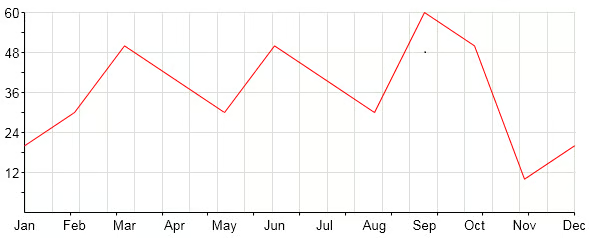
    var chart = new RGraph.Line('cvs', [20,30,50,40,30,50,40,30,60,50,10,20]);
    chart.Set('chart.labels', ['Jan','Feb','Mar','Apr','May','Jun','Jul','Aug','Sep','Oct','Nov','Dec']);
    chart.Set('chart.tooltips', ['Jan','Feb','Mar','Apr','May','Jun','Jul','Aug','Sep','Oct','Nov','Dec']);
    chart.Set('chart.events.click', function (e, shape) {alert('The Line chart click event');});
    chart.Draw();
}The above code produces the following in the browser:
Overall, a solid offering! Here’s how I ranked it on a scale of 1 to 10, where 10 is the highest possible score:
- look and feel: 9
- ease of use: 9
- features: 8
- browser compliance: 10
RGraph is free to use on non-commercial websites, but commercial sites may purchase a single license for 49 pounds.
Highstock/Highcharts
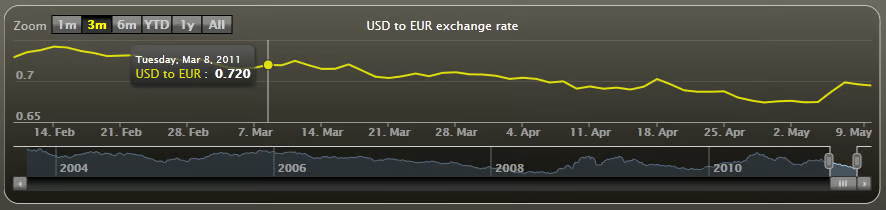
Highsoft Solutions first released Highstock in October of 2011. That library was geared towards stock or general timeline charts, and included options such as a small navigator series, preset date ranges, date picker, scrolling, and panning. Soon after, Highcharts arrived on the scene, offering other interactive chart types, including line, spline, area, areaspline, column, bar, pie, scatter, angular gauges, arearange, areasplinerange, columnrange, and polar chart types. Whew…
It is also completely free to use on personal, school, and non-profit organization websites. Commercial licenses start at $80 USD for a single site.
Highstock and Highcharts use VML to render charts in legacy Internet Explorer.
Highsoft Solutions makes generous usage of object literal notation, which is great, because it tends to be easy to work with:
$(function () {
    var chart;
    $(document).ready(function() {
        chart = new Highcharts.Chart({
            chart: {
                renderTo: 'container',
                type: 'column'
            },
            title: {
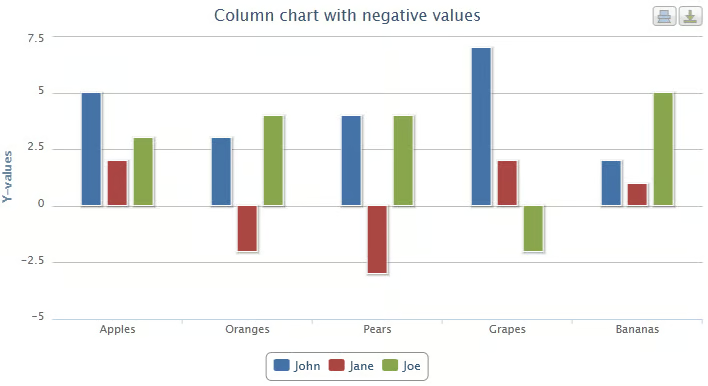
                text: 'Column chart with negative values'
            },
            xAxis: {
                categories: ['Apples', 'Oranges', 'Pears', 'Grapes', 'Bananas']
            },
            tooltip: {
                formatter: function() {
                    return ''+
                        this.series.name +': '+ this.y +'';
                }
            },
            credits: {
                enabled: false
            },
            series: [{
                name: 'John',
                data: [5, 3, 4, 7, 2]
            }, {
                name: 'Jane',
                data: [2, -2, -3, 2, 1]
            }, {
                name: 'Joe',
                data: [3, 4, 4, -2, 5]
            }]
        });
    });

});
Themes can be defined using the Highcharts.theme object. It allows you to create some really impressive looking charts!
Highcharts.theme = {
   colors: ['#058DC7', '#50B432', '#ED561B', '#DDDF00', '#24CBE5', '#64E572', '#FF9655', '#FFF263', '#6AF9C4'],
   chart: {
      backgroundColor: {
         linearGradient: [0, 0, 500, 500],
         stops: [
            [0, 'rgb(255, 255, 255)'],
            [1, 'rgb(240, 240, 255)']
         ]
      },
      borderWidth: 2,
      plotBackgroundColor: 'rgba(255, 255, 255, .9)',
      plotShadow: true,
      plotBorderWidth: 1
   },
   title: {
      style: {
         color: '#000',
         font: 'bold 16px "Trebuchet MS", Verdana, sans-serif'
      }
   },
   subtitle: {
      style: {
         color: '#666666',
         font: 'bold 12px "Trebuchet MS", Verdana, sans-serif'
      }
   },
   xAxis: {
      gridLineWidth: 1,
      lineColor: '#000',
      tickColor: '#000',
      labels: {
         style: {
            color: '#000',
            font: '11px Trebuchet MS, Verdana, sans-serif'
         }
      },
      title: {
         style: {
            color: '#333',
            fontWeight: 'bold',
            fontSize: '12px',
            fontFamily: 'Trebuchet MS, Verdana, sans-serif'

         }
      }
   },
   yAxis: {
      minorTickInterval: 'auto',
      lineColor: '#000',
      lineWidth: 1,
      tickWidth: 1,
      tickColor: '#000',
      labels: {
         style: {
            color: '#000',
            font: '11px Trebuchet MS, Verdana, sans-serif'
         }
      },
      title: {
         style: {
            color: '#333',
            fontWeight: 'bold',
            fontSize: '12px',
            fontFamily: 'Trebuchet MS, Verdana, sans-serif'
         }
      }
   },
   legend: {
      itemStyle: {
         font: '9pt Trebuchet MS, Verdana, sans-serif',
         color: 'black'

      },
      itemHoverStyle: {
         color: '#039'
      },
      itemHiddenStyle: {
         color: 'gray'
      }
   },
   labels: {
      style: {
         color: '#99b'
      }
   }
};

// Apply the theme
var highchartsOptions = Highcharts.setOptions(Highcharts.theme);Did I say great looking charts? Take a look at these examples:
- look and feel: 10
- ease of use: 8
- features: 8
- browser compliance: 10
Conclusion
The two charting libraries that we looked at today were both worthy choices, but don’t decide just yet! There are so many more out there to explore. Before making a decision, think about what features are most important to you as well as what type of data do you want to display. Should your charts have animation, tooltips, wide browser acceptance? These are decisions that should not be made in haste.
