Using Views in Apache Cordova
On mobile devices, the UI of a Cordova application is displayed as a “web view” that takes up the entire screen. As with many mobile apps, Cordova apps tend to be written as Single Page Applications (SPA), but, as we’ll see here today, there is nothing stopping you from adding pages and/or views. In either case, the first view that comes up upon starting your app – some might also refer to it as the main view – is called the Home View. In today’s article, we’ll learn how to configure your home view to perform a search and display the results within the same page.
The Web View in Apache Cordova
The Cordova Framework acts as an Application Container (or wrapper) that takes HTML, JavaScript, and CSS, and packages them as a Web application that may be run as a natively-installed application on supported mobile devices. The exact application install format depends on the target native Operating System (OS). For instance:
- On iOS, the final build output is an .ipa file (iPhone Application Archive)
- On Android, the output is an .apk (Android Application Package)
- On Windows Phone, the output is a .xap file
The following illustration depicts Apache Cordova’s native architecture, including the Web View:
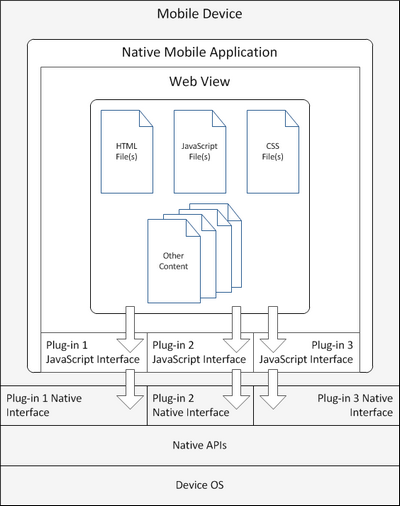
You still need to account for differences in DOM implementation between devices, but Cordova everything can be accomplished via a common JavaScript API that is converted into the target device’s own API at build time. For instance, you would access the phone’s camera to take a picture as follows:
navigator.camera.getPicture( onSuccess, onFail );
The final generated code might look something like this:
camera.takePicture( shutterCallback, rawCallback, jpegCallback );
UIImagePickerController *imgPckr = [[UIImagePickerController alloc] init];
Setting up the Home View
All of your application views reside within a single page – usually index.html. The “views” of the application are injected into the DOM as needed by the framework as the user navigates through the app.
Cordova places all of its initialization code within an “Immediate Function” in the app.js file to avoid polluting the global scope:
(function () {
}());
You could define a function named renderHomeView() inside the immediate function to programmatically add the Home View markup to the body element, but adding all of your application’s core processes to the immediate function can very quickly become unwieldy. It’s considered better practice to create a HomeView class that encapsulates the logic to create and render your Home View.
The coding examples that you’ll see here refer to code and classes from the Apache Cordova Tutorial on GitHub. You may want to check it out to gain a better overall understanding of this app and its code.
The first step is to create a file named HomeView.js in the js directory, and define a HomeView constructor:
var HomeView = function (service) {

}
The constructor function takes a search service as an argument. This service is really an EmployeeService and is defined in the “js/services/memory/EmployeeService.js” script. The findByName method submits the search criteria to a server-side component via Ajax:
var EmployeeService = function() {
var url = "http://localhost:5000/employees";
this.findByName = function(searchKey) {
return $.ajax({url: url + "?name=" + searchKey});
}
}
The EmployeeListView class is responsible for displaying the matching employees. It goes in a file named EnployeeListView.js in the js directory:
var EmployeeListView = function () {

    var employees;

    this.initialize = function() {
        this.$el = $('<div/>');
        this.render();
    };

    this.setEmployees = function(list) {
        employees = list;
        this.render();
    }

    this.render = function() {
        this.$el.html(this.template(employees));
        return this;
    };

    this.initialize();
}
Inside the HomeView constructor, the app is initialized as follows:
var HomeView = function (service) {
var searchListView;
this.initialize = function () {
this.$el = $('<div/>');
this.$el.on('keyup', '.search-key', this.findByName);
searchListView = new SearchListView();
this.render();
};
this.initialize();
}
The render() function also needs to be added to the above HomeView class. To keep the view reusable, the HTML should be attached to the div wrapper (this.el) instead of the document body:
this.render = function() {
    this.$el.html(this.template());
    $('.content', this.$el).html(employeeListView.$el);
    return this;
};
Finally, the HomeView class’s findByName() function invokes the service’s findByName() method, passing in the done() event handler:
this.findByName = function() {
    service.findByName($('.search-key').val()).done(function(contacts) {
        employeeListView.setSearchResults(contacts);
    });
};
Using Your HomeView Class
The index.html and app.js files also need to be modified to utilize the HomeView class rather than the default initialization.
In index.html, add a script tag to include HomeView.js (just before the script tag for app.js):
<script src="cordova.js"></script>
<script src="lib/fastclick.js"></script>
<script src="lib/handlebars.js"></script>
<script src="lib/jquery.js"></script>
<script src="lib/pageslider.js"></script>
<script src="lib/router.js"></script>
<script src="js/services/memory/EmployeeService.js"></script>
<script src="js/EmployeeListView.js"></script>
<script src="js/HomeView.js"></script>
<script src="js/EmployeeView.js"></script>
<script src="js/app.js"></script>
In app.js, remove the renderHomeView() and findByName() functions from the Local Functions section of the immediate function:
(function () {
function findByName() {
service.findByName($('.search-key').val()).done(function (employees) {
$('.content').html(employeeListTpl(employees));
});
}
function renderHomeView() {
$('body').html(homeTpl());
$('.search-key').on('keyup', findByName);
}
}());
Then, modify the adapter initialization logic to display the Home View when the adapter has been successfully initialized. Pass the search service as an argument to the Home View constructor:
service.initialize().done(function () {
    $('body').html(new HomeView(service).render().$el);
});
Conclusion
In the next article, we’ll be defining some HTML templates and moving their initialization from app.js to the prototype of the HomeView and EmployeeListView classes. Once that’s done, we’ll configure the application routing and take it for a test run.