


The main purpose of this article is to present the various HTML5 elements that you can use in an HTML document structure for styling blocks. As you may notice, many web sites contain HTML code like: <div id=”nav”> <div class=”header”> <div id=”footer”> used to indicate navigation, header, and footer. HTML5 offers new semantic elements to define different parts of a web page:
The new HTML5 elements we will cover in this article are:
- <header>: contains the header content of a site.
- <footer>: contains the footer content of a site.
- <nav>: contains the navigation menu.
- <article>: specifies independent, individual content, such as individual blog posts, videos, images or news items.
- <section>: The <section> element is a structural HTML element used to group together related elements, like headers, footers, chapters, or any other sections of the document.
- <aside>: defines a block of content that is related to the main content around it, but not central to the flow of it.
Typical Page Structure
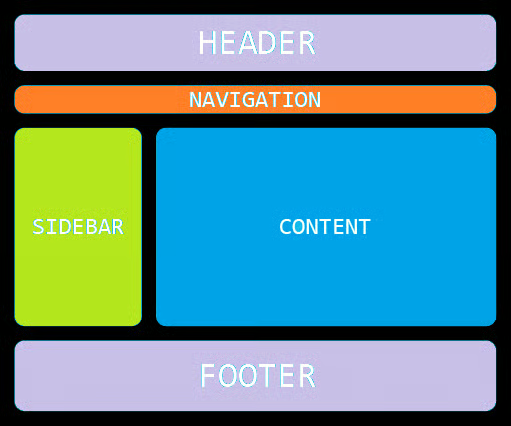
As you probably noticed, websites generally have vastly different content, functionality, and look and feel, but they all have common elements, as you can see from the figure below:
- Header (or masthead) at the top of the page, usually containing the company name and logo. This is the top of the page and in general, says what website is, some description, and who owns it.
- Navigation menu used for navigating between pages or down the page. This is placed under the header, often put in a sidebar, or may be form part of the header.
- One or more sidebars (placed in right or left of the main content of the page), containing some links, in general, that are related to the current page main content, related to the other pages from the website or from the outside of the website. The sidebar/sidebars may differ from one page to the other, (for example: “your basket” information on an e-commerce site, or some filters during on a shopping item, like colors, sizes, price filter, material etc).
- A footer that is placed at the bottom of the site and contains subsidiary information such as copyright information and contact details.
Let’s have a look at some of the HTML5 elements in more detail.
<section>
The <section> tag defines sections in a document, like headers, footers, chapters, or any other sections of the document.
<section>
  <h2>Head</h2>
  <p>Some text</p>
  <img src="figure.jpg" alt="figure">
</section>
<article>
The <article> tag is related to the <section> tag, but the <article> specifies independent, individual content , such as individual blog posts, videos, images or news items, comment, while <section> tag is used for grouping distinct sections of content or functionality. An article should make sense on its own and it should be possible to distribute it independently from the rest of the site.
<article>
  <h2>Head</h2>
  <p>Some text</p>
  <img src="figure.jpg" alt="figure">
</article>
<header> and <footer>
As we said earlier, the purpose of the <header> and <footer> elements is to wrap the header and footer content. In general, the <header> element contains a logo image, and the <footer> element contains some copyright notice, but is not mandatory to be that way, you can add more elaborate content if you like. Also note that you can have more than one header and footer on each page, you can also have a <header> and <footer> element nested inside each <article>, in which case they would just apply to that particular article. Adding to our above example:
<article>
  <header>
  </header>

  <section id="intro">
  </section>

  <section id="main content">
  </section>

  <section id="summary">
  </section>

  <footer>
  </footer>
</article><nav>
The <nav> element is for defining a set of the navigation links or other constructs (like a search form) that will take you to different pages of the current site, or different areas of the current page.
<nav>
  <a href="/html/">HTML</a> |
  <a href="/css/">CSS</a> |
  <a href="/js/">JavaScript</a> |
  <a href="/jquery/">jQuery</a>
</nav>
<aside>
The HTML <aside> tag is used to identify content which is related to the primary content of the web page but is not the main content of the page; represents a portion of a document whose content is only indirectly related to the document’s main content. Asides are frequently presented as sidebars or call-out boxes. Other good choices for an <aside> would be information about the author of the blog post(s), a biography, related links, related content, and advertisements are some examples of content that could be placed in an aside element.
HTML5 Element Support
Most of the HTML5 elements listed above in this article are supposed to behave like block elements, but the easiest way to make them behave properly in older browsers is by setting them to display:block; in your CSS. You can do this by including the following CSS rule at the top of your CSS, whether it is contained in the head of your HTML file, or as an external CSS file:
article, section, aside, hgroup, nav, header, footer, figure, figcaption {
  display: block;
}
What about <div>?
So, you probably think that with all these great new elements to include on our pages, the days of the <div> tag are numbered. In fact, the <div> still has a thoroughly solid use. The <div> tag should be used when there is no other more relevant element available to group some of content. A common example is using a <div> to wrap all of the content on the page, and then using CSS to center all the content in the browser window or apply a specific background image to the whole content.
The listing below is the actual template that will show you how all of these elements are properly nested together and that contains all the above described HTML elements:
<!DOCTYPE html>
<html>
<body>

<div id="wrapper">
<header><h1>Header</h1></header>
<nav>
  <a href="/link1/">LINK 1</a> |
  <a href="/link2/">LINK 2</a> |
  <a href="/link3/">LINK 3</a> |
  <a href="/link4/">LINK 4</a>
</nav>

<article>
	<header><h1> Example </h1></header>
		<section>
		<header>
	   		<hgroup>
				<h1>This is a heading and identifies the topic of its section.</h1>
				<p>This paragraph introduces the topic of the heading.</p>
            </hgroup>
		</header>
		<p>Everything in a document is related, the block structure identifies the
		order and intensity of the relationships.</p>
		<ul>
			<li>This is an unordered list.</li>
			<li>List items are more closely related than items in divisions.</li>
			<li>There is no significance to the sequence of unordered list items.</li>
		</ul>
		<h3>HTML Elements</h3>

	<table>
  <colgroup>
    <col style="background-color: #0f0">
    <col span="2">
  </colgroup>
		<tr><td>article</td><td>a self-contained piece of content</td></tr>
		<tr><td>aside</td><td>Secondary content, such as a sidebar</td></tr>
		<tr><td>footer</td><td>Footer part</td></tr>
		<tr><td>header</td><td>Header part</td></tr>
		<tr><td>nav</td><td>Navigation region</td></tr>
		<tr><td>section</td><td> The grouped related elements.</td></tr>
</table>

	</section>
	<footer>
		<p>A footer commonly contains information like copyright or owner of the website.</p>
	</footer>
</article>

<aside id="sidebar">
	<p>An aside indicates content that is tangentially related to the content around it. Can be 	used as a sidebar.</p>
</aside>
</div>
</body>
</html>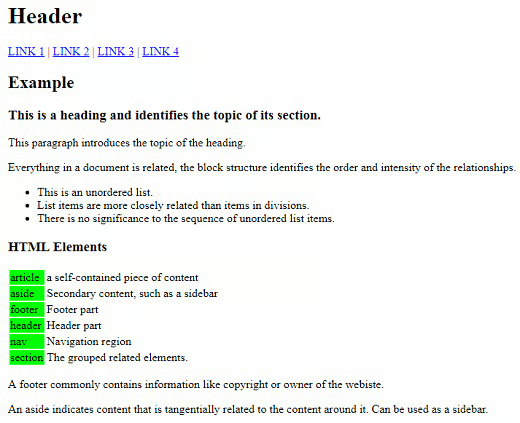
Conclusion
During this article you’ve seen the main HTML elements used for styling HTML blocks.
