
Essentially an API (Application Programming Interface) governs the interactions between software components. API’s have a major role in the world of the web, making it possible to connect applications and streamline the way they work together.
An API can be used in many ways. As an example, Facebook launched its SDK (Software Development Kit) which gives developers a platform to build games that work across multiple platforms.
An API can be used in many other ways, too. As an example, one program I wrote about recently was OptimizePress 2.
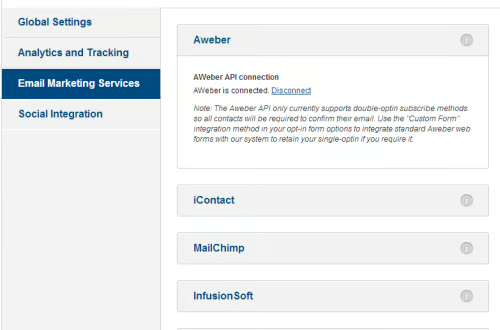
In the screen shot above, the creators of OptimizePress created several API’s to connect with several third party autoresponder providers. Connecting the API’s was a simple as clicking a link, then entering some configuration information after the programs were connected.
We’re going to look at some tips and best practices in this article.
Determine How the API Will Be Used
As with any project, the first step is to determine how the API will be used, so some brainstorming is necessary. One can do this by creating a flow chart or by use of a mind map, where you place any and all ideas on a sheet of paper, then edit the results later.
When editing, look for key components. If you have any doubts about any given component, leave it out.
During the design state, keep the specification short, because that will make it easier to modify later. You can always flesh it out as you go along.
In order to achieve the best possible result, it’s necessary to know where the API will be used and design to that environment.
When building the API, build it in terms of being able to reuse the modules.
Some Characteristics of a Good API
· Easy to learn
· Easy to use
· Easily scalable
· Fulfills the purpose
· Easy to maintain and upgrade the code
Easy to Explain
It should be easy to explain what your API does in a few words. If not, you’ll need to simplify the idea. If necessary, break the API design process into modules.
Get Feedback During the Design Process
When building the API, make sure you get feedback from the customer and/or end users to let you know if things are running smoothly or if there are any glitches that need to be fixed. Taking care of this up-front is easier than dealing with problems after the API has been released to the public.
If there are errors, make sure your customer/users report them immediately so they can be fixed. Over time, you’ll be able to refine the API and make it better.
Make sure you don’t do the design work alone. Access to colleagues or working with a team is recommended.
Reduce Web Methods
Reduce the number of web methods in your design, keep redundancy to a minimum (to avoid confusion) and keep coding consistent. Only give the consumer what they need to know.
Use SSL (Secure Socket Layer)
Computer users are everywhere, in stores, libraries, coffee shops, airports, etc. Many of these locations don’t encrypt communications, making them easy targets for eavesdropping or hacking.
Take Time to Get It Right
This is especially important if you’re building public API. Get it wrong and you run the risk of disgruntled users and many support calls.
Documentation
This is one of the most important steps that so many programmers leave out, or worse, if they do write about it, the instructions can be cryptic, making them difficult to understand. A valuable tactic is to write as if you’re speaking to a ten year-old.
Leave nothing out (including those steps that you think everyone should know – write them down). Use plenty of illustrations with highlighting if necessary. If the process is really complex, add more illustrations. This will help avoid confusion.
Make sure to test the documentation for errors and give it to several third parties to do so, not the members of your team. Another test of the API is to see how well it can be understood without referring to the documentation. If it can be easily understood, there’s a good chance of having created a good API.
Be Realistic
As a developer you’ll want to cover all contingencies, but that’s not possible in reality. Even with the best team, brainstorming, etc. there will be some things that you’ll miss; that you’ll have to fix after the fact. The other thing to remember is you won’t be able to please everyone.
Resources
· What is API (Application Programming Interface) Mode and how does it work?
· API Best Design Practices
