
As the name suggests, the primary purpose of Angular Route Guards is to guard access to a certain route, such as an authenticated area of your app, or an admin section that requires special permissions to be accessed. Once admission to a route has been blocked, the next step is often to redirect the user to some other view. As such, this functionality is often baked into the Route Guard, by injecting the router via the constructor and invoking one of its navigate methods.
Being associated with a specific route, Route Guards work wonderfully as routing switchboards that can set the destination view based on a number of dynamic factors. In today’s article, we will create a Route Guard that determines the parameterized route based on the result of a method call to an asynchronous service.
Read: Asynchronous Programming in JavaScript
The Limitations of Static Routes in Angular
Although Angular allows for the setting of redirects as part of the route definitions,
these are limited to hard-coded strings:
const routes: Routes = [
  { path: 'first-component', component: FirstComponent },
  { path: 'second-component', component: SecondComponent },
  { path: '', redirectTo: '/first-component', pathMatch: 'full' }
];
As a consequence, we cannot determine the redirect view at runtime. We can, however, insert a Route Guard into the route that is invoked when the path matches. The routes array below declares two main views: home and users. The latter also includes an :id parameter that will tailor the view for a specific user:
const routes: Routes = [
  {
    path: "home",
    component: HomeComponent
  },
  {
    path: "users",
    canActivate: [RedirectService],
    component: UsersComponent
  },
  {
    path: "users/:id",
    component: UsersComponent
  },
  {
    path: "**",
    pathMatch: "full",
    redirectTo: "/home"
  }
];
@NgModule({
  imports: [RouterModule.forRoot(routes)],
  declarations: [HomeComponent, UsersComponent],
  exports: [RouterModule]
})
export class RoutingModule {}
Activating the users view will hence invoke our RedirectService’s canActivate() method, allowing us to redirect the application user to the appropriate user page. Even though we specified a component for the users route (it’s required), we won’t ever land there because our RedirectService will intercept navigation between routes and redirect to a parameterized users/:id route instead.
Read: HTML, CSS, and JavaScript Tools and Libraries
The RedirectService
All that a service requires to act as a Route Guard is to implement the CanActivate interface. It acts as a contract whereby our service promises to include the canActivate() method. Beyond that, it has to return one of three types:
- Observable<boolean>
- Promise<boolean>
- boolean
The first two are ideal for working with external asynchronous services and/or libraries such as RxJS. Our method will return an Observable<boolean> and emulate an external service call by creating our own Observable and introducing a delay. To determine which userId to set the :id parameter to, we’ll just throw the dice and pick a random number between 1 and 6. In a real-world application, we would probably have to check permissions at the very least. There could be a variety of other conditions to check as well, from application modes to selected options on the current page.
@Injectable()
export class RedirectService implements CanActivate {
  constructor(private router: Router) {}

  canActivate(): Observable<boolean> {
    this.getInitialUserId().subscribe((userId: number) => {
      this.router.navigate(["users/" + userId]);
    });
    return of(false);
  }

  private getInitialUserId(): Observable<number> {
    return Observable.of(this.randomIntFromInterval(1, 6)).delay(500);
  }

  private randomIntFromInterval(min: number, max: number) {
    return Math.floor(Math.random() * (max - min + 1) + min);
  }
}
In order to add the userId to the current route, we can inject the Router object via the constructor and employ one of its many navigate() methods to redirect to the new page.
Notice that, even though we are redirecting, the canActivate() method must still return a value. To convert the boolean value of false to an Observable, we can utilize the RxJS of() method. Returning false prevents the application from navigating to the users view before the redirect has occurred. Since there is a delay involved, we could see an empty users page for a split second before it reloads.
Read: RxJS Observables Primer in Angular
The UsersComponent
Once the parameterized route has been activated, the target component (UsersComponent) can make use of the :id parameter by subscribing to the ActivatedRoute’s Params Observable. To keep things simple, we’ll simply display it on the page:
@Component({
  selector: "users-component",
  template: `<h1>Users Component</h1>
    <p>This view is for user #{{ userId }}</p>`
})
export class UsersComponent {
  public userId: string;

  constructor(route: ActivatedRoute) {
    route.params.subscribe((params) => {
      this.userId = params["id"];
    });
  }
}As always, there’s a demo of today’s project on Codesandbox.io.
Here is the output of the above code in the browser:
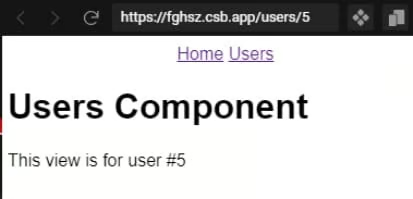
Conclusion of Dynamic Routing in Angular 12
In this article, we created a Route Guard to redirect to a parameterized route based on the result of a method call to an asynchronous process. By doing so, our Route Guard functions as a routing switchboard that can set the destination view at runtime. I’ve also seen the target component handle the redirects. The question as to whether to place the redirect login in the component or Route Guard will depend on whether or not there is a possibility that the user does not have sufficient permissions to access the component in question.
Read more JavaScript web development and programming tutorials.
