
Working in the realm of data visualization, as I do, you soon learn that many charts and graphics entail some sort of temporal element. For example, take this chart:
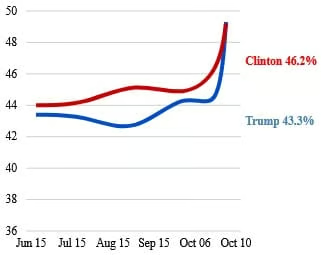
Basic as it may be, as far as charts go, generating readable ticks, labels, tooltips, legends, and other text for many different locales takes a high quality toolset. One indispensable tool that many web developers depend on is D3. Short for Data-Driven Documents, D3 is an open source data visualization library that helps bring your data to life using a combination of W3C compliant HTML, SVG, and CSS. As we will see in this tutorial, its got all of your date formatting covered.
Read: Displaying Custom Date Formats in Angular
Setting the Locale the Hard Way with D3
Out of the box, the only locale that comes pre-loaded is en_US. To create a formatter for a different locale, you have to instantiate it via the d3.locale() method. It accepts a locale definition that contains all of the locale-related information. Here is what the de_DE (Germany) definition’s date fields look like:
{
  "dateTime": "%A, der %e. %B %Y, %X",
  "date": "%d.%m.%Y",
  "time": "%H:%M:%S",
  "periods": ["AM", "PM"],
  "days": ["Sonntag", "Montag", "Dienstag", "Mittwoch", "Donnerstag", "Freitag", "Samstag"],
  "shortDays": ["So", "Mo", "Di", "Mi", "Do", "Fr", "Sa"],
  "months": ["Januar", "Februar", "März", "April", "Mai", "Juni", "Juli", "August", "September", "Oktober", "November", "Dezember"],
  "shortMonths": ["Jan", "Feb", "Mrz", "Apr", "Mai", "Jun", "Jul", "Aug", "Sep", "Okt", "Nov", "Dez"]
}
When you want to use the format of a locale other than en-US, this is the usual process:
var localeDef = *{locale definition object};
var timeFormatter = d3.timeFormatLocale(localeDef);
var timeFormat = timeFormatter.format(localeDef.date);

*locale definition object not included.
Notice that you have to provide the locale definition object. The drawback with this approach is that, looking up all of the day and month names for many different locales requires some research, especially if you are uncertain how a particular country formats their dates and times. Thankfully, as we will see in the next section, there is a far easier approach!
Read: Parsing Dates and Times Using Luxon
Setting the Locale the Easy Way with D3
Certainly someone has compiled a selection of locale definitions for general use? In fact, someone has. The d3-time-format module extends D3 to provide a JavaScript implementation of the venerable strptime and strftime functions from the C standard library, as well as date parsing and formatting in a variety of locale-specific representations. With respect to the latter, the project contains a large number of locale definition files. Better still, these files are readily accessible from your scripts via the jsDelivr Content Delivery Network.
Let’s take a look at how to use it.
Consuming Hosted Locale Definition Files with fetch()
The recommended way to download the locale definition files is to use the global fetch() method. It returns the response as a Promise so you can pass it along to other methods using the then() method. Here is an example that formats the current date for the fr-FR (France French) locale:
const localeFR = await fetch("https://cdn.jsdelivr.net/npm/d3-time-format@3/locale/fr-FR.json")
  .then(d => d.json())
  .then(d3.formatLocale);
const formatter = localeFR.timeFormat("'%d %B %Y");
console.log(formatter(Date.now())); // 05 février 2022
Likewise, we can use the locale object to set the default formatting:
const localeFR = await fetch("https://cdn.jsdelivr.net/npm/d3-time-format@3/locale/fr-FR.json")
  .then(d => d.json())
  .then(locale => {
    d3.timeFormatDefaultLocale(locale);
    console.log(d3.timeFormat(locale.date)); // 05 février 2022
  });
Applying Custom Formatting to Date Formats in 3D
If you need to modify one or two format types, there is no need to replace the entire locale definition; just override the one(s) that apply. To illustrate, here is a service that uses the predefined formats for all locales but Chinese:
const LOCALE_REPO = 'https://cdn.jsdelivr.net/npm/d3-time-format@3/locale/';

@Injectable()
export class DateLocaleService {
  private readonly customDateFormats = new Map<string, string>([
    ['en-CA', '%B %d, %Y'],
    ['fr-CA', '%d %B %Y'],
    ['es-ES', '%d de %B de %Y'],
    ['de-DE', '%d. %B %Y'],
    ['zh-TW', '%Y %B %d'],
  ]);

  public async setLocale<T>(locale: string): Promise<T> {
    const localeString = this.convertEnumKeyToLocale(locale);

    return await fetch(`${LOCALE_REPO}${localeString}.json`)
      .then(d => d.json())
      .then(locale => {
        const timeFormatLocale = d3.timeFormatLocale(locale);
        //Use a custom format for Chinese
        const dateFormat = locale === 'zh-TW'
          ? this.customDateFormats.get(locale)
          : locale.date;
        return timeFormatLocale.format(dateFormat) as T;
      });
  }
}The <T> generic tells the TypeScript transpiler that the caller should expect the Promise to contain whatever type it specifies. You can see below that we are expecting a Function to be returned. Specifically, it’s the formatting function for displaying dates in the chosen locale:
private formatDate(locale: string) {
  this.dateLocaleService.setLocale<Function>(locale)
    .then((formatter) => {
      this.formattedDate = formatter(this.testDate);
    });
}
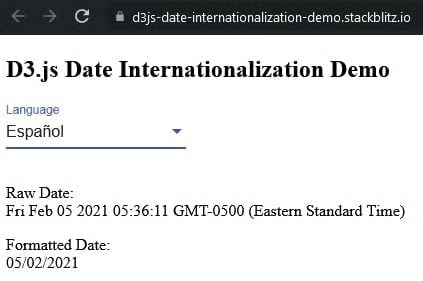
To help better understand today’s code, there’s a demo on stackblitz. Just select a language from the drop-down and it will be displayed below according to the date format specified in the locale definition’s date attribute.
Conclusion to D3.js Internalization
Whatever type of temporal data you want to bring to life, rest assured that D3 has got you covered! No need to import additional date parsing and/or formatting libraries like moment.js or Luxon; simply fetch the locale definition file you need from the d3-time-format repository and you’re all set!
Read: Date Validation Using Moment.js
