
With the abundance of Promises, Observables, and setTimeouts in modern JavaScript applications, it is imperative that developers understand how to work with asynchronous processes. Async calls all share one thing in common, and that is that they require waiting for a method to complete before continuing on. In this article, web developers will learn how ES6 makes asynchronous programming easier with async, await, and Promises.all().
Using async in ES6
Adding the async keyword in front of a function declaration turns it into an asynchronous function. An async function is a function that knows to expect the possibility of the await keyword being used to invoke asynchronous code.
If we were to type the following lines into the browser’s JavaScript console, it would immediately print “Hello“:
const hello = () => "Hello";
hello();
We can turn the above method into an asynchronous one by adding the async keyword:
const hello = async () => "Hello";
hello();
Invoking the function now returns a promise. In fact, one of the key traits of async functions is that their return values are guaranteed to be converted to promises. We can now consume the returned value when the promise fulfills using a .then() block:
hello().then((value) => console.log(value));

//or even just shorthand such as:
hello().then(console.log);
We can use the async keyword with any method that returns a promise or Observable, as in the case of the HttpClient’s get() method. Here is a method that checks if a link is valid by fetching it and checking for a 401 (not found) error:
private async isValidLink(link: string): Promise<boolean> {
  return this.http.get(link, { responseType: 'text'})
    .pipe(
      map((res) => true),
      catchError(err => of(false))
    ).toPromise();
}

public goTo(page: string) {
  this.isValidLink(page).then(isValid => {
    if (isValid) {
      window.location.href = page;
    }
  });
}Read: Asynchronous Programming in JavaScript
The await Keyword
The advantage of an async function becomes apparent when you combine it with the await keyword. It is put in front of any asynchronous promise-based function to pause your code on that line until the promise fulfills, then returns the resulting value. We can use await when invoking any function that returns a Promise, including web API functions.
Here is a trivial example:
const hello = () => await Promise.resolve("Hello");
hello().then(console.log);
We could have written the goTo() method as follows to wait for a response from isValidLink():
public goTo(page: string) {
  const isValid = await this.isValidLink(page);
  if (isValid) window.location.href = page;
}
Using Promises Inside a Loop
Executing asynchronous methods within a loop can quickly compound timing issues. Therefore, it is crucial to manage them properly. Beyond the techniques mentioned previously, you can also employ the static Promise.all() method for iterative processing. It accepts an iterable of promises as an input parameter and gives you back a single promise that resolves to an array of the results of the input promises provided. It rejects immediately upon any of the input promises rejects or throws an error, and will reject with this first rejection message/error. Here is the general procedure for using Promise.all():
const promises = [];

for (let i = 0; i < collectionSize; i++) {
  promises.push(doSomeAsyncStuff());
}

Promise.all(promises)
  .then(() => {
    for (let i = 0; i < collectionSize; i++) {
        doSomethingOnlyWhenTheAsyncStuffIsDone();
    }
  })
  .catch((e) => {
    // handle errors here
  });
Now, let’s take a look at an async method that validates an array of links and maps them to an array of boolean values that contain the results of all the isValidLink() invocations:
public async hideTheBadLinks() {
  Promise.all(this.links.map(link => this.isValidLink(link)))
    .then(results => this.links = links.filter((_, i) => results[i]));
}Once all of the promises have been resolved, Promise.all() executes the callback method via then(). There, invalid links are removed from the links array.
Read: The JavaScript FOR Loop
The Russian Roulette Link Game
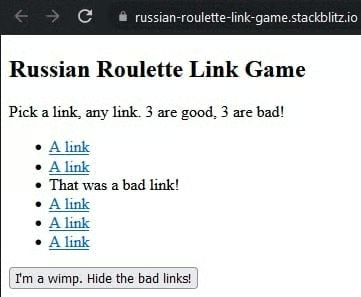
To show all of the above concepts in action, I would direct you to the Russian Roulette Link Game. This considerably safer version of the game uses links rather than bullets and randomly splits six choices between bad links and valid ones. In order to avoid navigation to 404 pages, the app fetches the page using the HttpClient’s get() method and converts the link element to a “bad link” message:
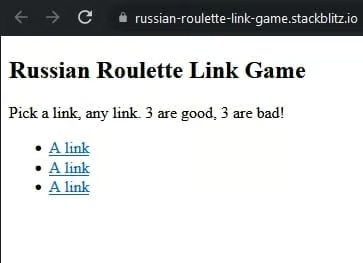
The Hide the bad links button removes invalid links by running through all of the links in succession and then replacing them with the smaller list of valid links:
The app source code contains some other goodies, such as link randomizing using the Durstenfeld shuffle algorithm, replacing page elements using the Angular Renderer2 object, and other neat tricks!
Conclusion to Async Programming in ES6
Promises, subscription to Observables, and setTimeout() calls all require waiting for a method to complete before continuing on. ES6 makes asynchronous programming easier with the async and await keywords. Finally, Promises.all() provides a means of corralling several asynchronous methods into an array of results that we can then iterate over for additional processing.
Read more ES6 and JavaScript web development tutorials.
