


Introduction
Even though CSS3 is not supported on all browsers yet, many web developer have started to use some of the techniques that it provides. CSS3 has evolved into a technology which, when combined with HTML5 and JavaScript, may end up being a Flash-killer. In this series of articles, we will cover the key additions to CSS3. In the previous article, we learned about border properties with CSS3; and today we will cover the text styling properties that it has to offer.
New Selectors in CSS3
Among other features, CSS3 has also introduced a few new selectors. While many developers overlook selectors and use classes instead; those who understand the importance of selectors really appreciate it.
Selectors allow you to drastically reduce the server-side or Javascript code that is used to style content on the page. Read further to see how.
:nth-child() and :nth-last-child()
This is definitely my favorite selector in CSS. It is based on the :fist-child and :last-child selectors introduced in an earlier version of CSS. This allows you to target a particular child of an element in the page. Moreover, you can pass it ‘odd’ or ‘even’ too. The most evident of examples of this is to style alternate rows of a table differently. So far we needed to use either server-side or javascript code to write the logic for this, but now CSS has become smart enough to understand it.
Here is an example of alternate row styling with CSS3.
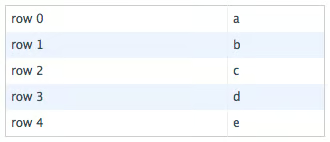
Alternate row styling
And here is the code for it:
<
table class=
”
alternate
”
cellspacing=
”
0
″
>
<
tr
>
<
td
>
row 0
<
/td
>
<
td
>
a
<
/td
>
<
/tr
>
<
tr
>
<
td
>
row 1
<
/td
>
<
td
>
b
<
/td
>
<
/tr
>
<
tr
>
<
td
>
row 2
<
/td
>
<
td
>
c
<
/td
>
<
/tr
>
<
tr
>
<
td
>
row 3
<
/td
>
<
td
>
d
<
/td
>
<
/tr
>
<
tr
>
<
td
>
row 4
<
/td
>
<
td
>
e
<
/td
>
<
/tr
>
<
/table
>
table.alternate tr :last-child { border-right: none; }
table.alternate tr:nth-child(odd) { background-color: #fff; }
table.alternate tr:nth-child(even) { background-color: #EDF3FE; }
You think this is cool? Then what about the fact that you can pass it any formula of the form ‘an+b’ where a and b are integers? Imagine a grid of images where you need to define the right margin of the column to 0? No need to add a special class any more.
Here is an example of a grid with CSS3.

Grid styling
And here is the code for it:
<
div id=
”
grid
”
>
<
div
>
<
/div
>
<
div
>
<
/div
>
<
div
>
<
/div
>
<
div
>
<
/div
>
<
div
>
<
/div
>
<
div
>
<
/div
>
<
div
>
<
/div
>
<
/div
>
#grid div { height: 100px; width: 100px; margin: 0 10px 10px 0; background: #f66; float: left; }
#grid div:nth-child(3n) { margin-right: 0; }
#grid div:nth-child(6) { clear: both; }
#grid div:last-child { float: right; margin-right: 0; }
:nth-last-child() is similar to nth-child() only it starts counting from the bottom.
Substring Matching Attribute Selectors
The ability to target elements by type, ID and class names wasn’t enough for some people, so they decided to allow targeting elements based on a substring contained in an attribute. Three symbols have been picked from regular expressions to specify the position of the substring.
- ^ – denoting the beginning of the attribute value.
- $ – denoting the end of the attribute value.
- * – denoting anywhere in the attribute value.
Here is an example of substring matching attribute selectors.
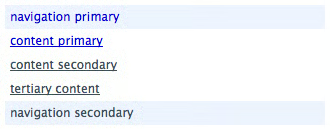
Substring matching attribute selectors
And here is the code for it:
<
div id=
”
nav-primary
”
>
navigation primary
<
/div
>
<
div id=
”
content-primary
”
>
content primary
<
/div
>
<
div id=
”
content-secondary
”
>
content secondary
<
/div
>
<
div id=
”
tertiary-content
”
>
tertiary content
<
/div
>
<
div id=
”
nav-secondary
”
>
navigation secondary
<
/div
>
div { padding: 2px 5px; width: 310px;}
div[id^=”nav”] { background: #EDF3FE; }
div[id$=”primary”] { color: #00c; }
div[id*=”content”] { text-decoration:underline; }
:first-letter and :first-line
Old-school typography sometimes liked to style the first letter and first line of chapters differently from the rest of the text. In want to support that in modern day digital typography, CSS3 allows you to target the first letter and first line of an element.
Here is an example of first letter and first line styling.

First letter and first line styling
And here is the code for it:
<
p class=
”
oldschool
”
>
…
..
<
/p
>
.oldschool::first-letter { float: left; font-size: 48px; line-height: 30px; padding: 2px; }
.oldschool:first-line { color: #900; }
Conclusion
These are some of the interesting and more widely supported selectors introduced in CSS3. Most if not all of these are supported in Mozilla and Web-kit browsers, however, Opera and Internet Explorer seems to be taking their sweet time to support some of these features. So until they don’t support them, we will have to also use fallback methods so that we can offer the same experience to all users.
