
I recently worked on a project where the client wanted to give visitors the ability to set the font to one specifically designed for people with dyslexia . I had visions of parsing the entire Document Object Model to set the font for every visible element, but to my surprise, it turned out to be a lot easier than I expected. Better still, the technique I discovered can be applied to other CSS properties as well.
Letting the Client Choose
Here’s a listbox that contains a number of web-safe fonts – that is to say those that are all but guaranteed to be installed on the client’s device.
<select id="fontChooser">
  <optgroup label="Serif Fonts">
    <option value="fontGeorgiaSerif">Georgia, serif</option>
    <option value="fontPalatinoSerif">"Palatino Linotype", "Book Antiqua", Palatino, serif</option>
  	<option value="fontTimesSerif">"Times New Roman", Times, serif</option>
  </optgroup>
  <optgroup label="Sans-Serif Fonts">
    <option value="fontArialSansSerif">Arial, Helvetica, sans-serif</option>
    <option value="fontComicSansMS">"Comic Sans MS", cursive, sans-serif</option>
  	<option value="fontVerdanaSansMS">Verdana, Geneva, sans-serif</option>
  </optgroup>
  <optgroup label="Monospace Fonts">
    <option value="fontCourierNew">"Courier New", Courier, monospace</option>
    <option value="fontLucidaConsole">"Lucida Console", Monaco, monospace</option>
  </optgroup>
</select>
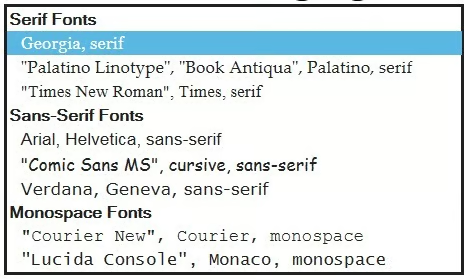
The above markup produces the following select element:
Georgia, serif”Palatino Linotype”, “Book Antiqua”, Palatino, serif”Times New Roman”, Times, serifArial, Helvetica, sans-serif”Comic Sans MS”, cursive, sans-serifVerdana, Geneva, sans-serif”Courier New”, Courier, monospace”Lucida Console”, Monaco, monospace
Styling Option Fonts
Some browsers allow styling individual options so you can provide a preview of what each will look like. You could create a class for this purpose, but I selected each option using its unique value instead:
<style type="text/css">
  option[value="fontGeorgiaSerif"]   { font-family: Georgia, serif !important; }
  option[value="fontPalatinoSerif"]  { font-family: "Palatino Linotype", "Book Antiqua", Palatino, serif !important; }
  option[value="fontTimesSerif"]     { font-family: "Times New Roman", Times, serif !important; }
  option[value="fontArialSansSerif"] { font-family: Arial, Helvetica, sans-serif !important; }
  option[value="fontVerdanaSansMS"]  { font-family: Verdana, Geneva, sans-serif !important; }
  option[value="fontComicSansMS"]    { font-family: "Comic Sans MS", cursive, sans-serif !important; }
  option[value="fontCourierNew"]     { font-family: "Courier New", Courier, monospace !important; }
  option[value="fontLucidaConsole"]  { font-family: "Lucida Console", Monaco, monospace !important; }
</style>Here is the list again in Internet Explorer 11 with styled options:
Binding a Handler to the Select’s OnChange Event
I like to place my handlers in the JavaScript file and use jQuery to bind them to their elements using the on() function:
$(document).ready(function(event) {
    $('select#fontChooser').on('change',function(e) {
      //this refers to the option
      setFont($(this).find("option:selected").text());
    });
});
The handler simply calls the delegate setFont() function, passing in the option’s text value. jQuery makes the option accessible to the function via the this pointer. Unfortunately, you can’t just read the text property. First you have to wrap it in the jQuery object and find the selected option before calling the text() function. Seems redundant I know.
Setting the Font Based on the Selection
The secret to dynamically applying a CSS property is the asterisk (*) selector. It selects ALL document elements at once! For best results, include the !important flag to your rule. That will override all elements’ styles except for those that have their own !important flag set.
You could add a rule to an existing CSS document, but I prefer to dynamically add or modify one that is just for my global property. Adding a new CSS Style block is easily done using the jQuery DOM append() function. Modifying an existing rule is a little more complicated. For starters, the jQuery $() and document.getElementById() selectors don’t return the kind of reference that we need. We want to access the document.styleSheets collection directly. Assuming that we aren’t adding any others at runtime, the last styleSheet is the one we’re after so document.styleSheets[document.styleSheets.length - 1] will return it. Each rule is also contained in a cssRules collection - another reason why it's best to segregate the font CSS from the others. The first and only element is located at index 0. Each cssRule in turn has a CSSStyleDeclaration style property. From there, the entire rule string is available to us via the cssText property, while individual CSS attributes are exposed via their JavaScript names. In our case, the font-family may be referenced using the JS camel-case name of fontFamily:
function setFont(newFont) {
  var fontStyleSheet = $('style#FontCSS'),
       fontRule = '* { font-family: ' + newFont + ' !important; }';
  if ( fontStyleSheet && fontStyleSheet.length > 0) {
    with ( document.styleSheets[document.styleSheets.length - 1].cssRules[0].style ) {
      cssText = "";
      fontFamily = newFont;
    }
  }
  else {
     jQuery("head").append('<style id="FontCSS" type="text/css">' + fontRule + '</style>');
  }
}Conclusion
Be vigilant to not overuse the asterisk (*) selector because, in a lot of cases, it’s far too generic. It makes better sense to apply rules to the specific elements that you want. With CSS3 selectors being so versatile, you can usually perform very complex DOM lookups all in one line.
