The basic concept of margin collapse is that if two margins are contiguous, they will collapse into one margin, which will have the largest of the two margins. When the top or bottom edges are adjacent, they overlap to form a single margin, and this is called collapsing. Basically, the single margin formed by the combination of the top and bottom edges of the blocks, whose size is the largest of the individual margins, is a behavior known as the collapsing edge.
Careful! the edges of the floating-point elements, the inline-block elements, the root element and the elements with overflow set to anything other than visible, never collapse.
Collapsing Between Text
Collapsed margins are closely related to the spacing of text blocks. For example, paragraphs have, by default, an upper margin of 12pt and a lower margin of 12pt.
When paragraphs are stacked, their margins do not add a 24pt gap, they will collapse and overlap to create only a 12pt space between the two paragraphs.
Look at the example below:
<!DOCTYPE html>
<html>
<head>
<style>
h1 {
  margin: 0 0 35px 0;
}
h2 {
  margin: 20px 0 0 0;
}
</style>
</head>
<body>
<h1>Tesco – "Every Little Helps"</h1>
<h2>Tesco – "Every Little Helps"</h2>
<p>This example contains a 35px bottom edge and an h2 element that has an 18px margin, which means the edge between h1 and h2 should be 53px. Despite these data, the real margin between the two edges ends with 35px</p>
</body>
</html>
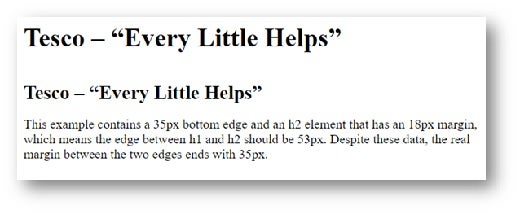
Figure 1
In the example above, the <h1> element has the lower margin of 35px, and the element <h2>, with the top edge set to 18px. Using a quick calculation, we might determine that the single margin of the two margins is 53px + 18px, but it’s not. Practically, due to the margin collapse, the real margin will reach 35px.
Collapsing Between Parent and Child Elements
The code and figure above shows the effect of collapsing between text and an adjacent element, but there is a another valid process for parents and children whose edges are touching. Practically, places that have no content between the adjacent edges are getting stuck. The effect in the ranks below set a large margin and a small margin between a parent element and a child element. Therefore:
<!DOCTYPE html>
<html>
<head>
<style>
h1 {
  margin: 0;
  background: DarkSalmon;
  color: white;
}
div {
  margin: 30px 0 35px 0;
  background: #cfc;
}
h2 {
  margin: 20px 0 0 0;
  background: DarkSeaGreen;
  color: white;
}
</style>
</head>
<body>
<h1>Collapsed margin in CSS</h1>
<div>
  <h2>Collapsing between parent and child elements</h2>
</div>
</body>
</html>
In this example, you can see that the value of the upper edge of the element <h2> has been declared, and this element <h2> is the child of the <div> element. Thus:
<h1>Collapsed margin in CSS</h1>
<div>
  <h2>Collapsing between parent and child elements</h2>
</div>
And this is the result:
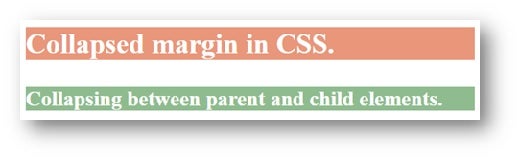
Figure 2
You probably expect the <h2> element to be located at 50px from the <h1> element, since the <div> element has a top margin of 30px and there is also a 20px margin of the <h2> element. You could have expected the <h2> element to display the background colors of the <div> element, but this does not happen because the collapsing edges together form a margin, applying the largest margin, the same as in adjacent blocks.
The same result would also be obtained if the <div> element had no upper edge, and the <h2> element would have a 35px margin, so that the upper edge of the <h2> element becomes the upper edge of the element <div>, pushing it down with the 35px <h2> element. In the following example, we will add an edge to the top of the <div> element to better exemplify the effect produced (the upper edge of the two elements is displayed). Therefore:
<!DOCTYPE html>
<html>
<head>
<style>
h1 {
  margin: 0;
  background: DarkSalmon;
  color: white;
}
div {
  margin: 30px 0 35px 0;
  background: #cfc;
  border-top: 3px solid black;
}
h2 {
  margin: 20px 0 0 0;
  background: DarkSeaGreen ;
  color: white;
}
</style>
</head>
<body>
<h1>Collapsed margin in CSS.</h1>
<div>
  <h2>Collapsing between parent and child elements.</h2>
</div>
</body>
</html>
And the final result looks like this:
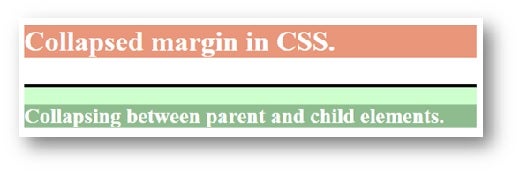
Figure 3
In the above image, we can see that the <div> element is still 35px from the <h1> element, that is to the title, and the element <h2> of the <div> element was pushed down another 20px from the background <div> by this delimiter line. The overlay must be applied to the parent element, that is the <div> element because if we choose to apply the edge of the element <h2>, that is the child element, this edge will not stop the edges from collapse.
In the example above, we used only one parent element and one child element whose edges are overlapping, but we can apply the same approach if there are more children, the elements being nested with the adjacent vertical edges, which would mean that all edges will collapse into one edge.
<!DOCTYPE html>
<html>
<head>
<style>
html {
  font-size: 12px;
  font-style: oblique;
}
body {
  background-color: darkgray;
  color: white;
  font-family: serif;
  padding: 25px;
  text-align: center;
}
h1 {
  font-size: 2em;
  font-weight: 600;
}
div {
  margin: 15px 0;
}
.padding {
  padding: 2px 0;
}
.maroon {
  background-color: Maroon  ;
}
.darkorchid {
  background-color: DarkOrchid ;
}
.darksalmon {
  background-color: DarkSalmon ;
}
.lightblue {
  background-color: LightBlue ;
}
.springgreen {
  background-color: MediumSpringGreen;
}
.brown {
  background-color: RosyBrown ;
}
</style>
</head>
<body>
<h1>Collapsing Child Margins</h1>
<div class="maroon">
  <div class="darkorchid">
    <div class="darksalmon">
      <div class="lightblue">
        <div class="springgreen">
          <div class="brown">Collapsed</div>
        </div>
      </div>
    </div>
  </div>
</div>
<div class="padding maroon">
  <div class="padding darkorchid">
    <div class="padding darksalmon">
      <div class="padding lightblue">
        <div class="padding springgreen">
          <div class="padding brown">Not Collapsed</div>
        </div>
      </div>
    </div>
  </div>
</div>
</body>
</html>
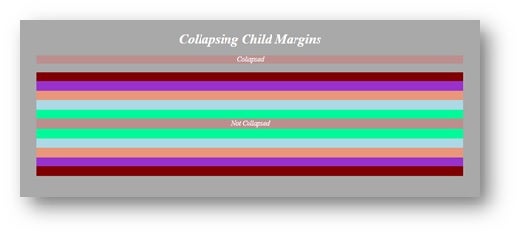
Figure 4
In this example, <div> is the parent and each class is a nested child element. The children’s margin will be overwritten by the parental margin, as long as the child element lives under the parent element’s roof. By adding 1px of the fill, it will allow the use of both edges. As long as there is something solid between parent and child, both margins will be used.
Conclusion
This margin collapse effect is not intuitive at first, but it makes it easier for multiple nested items. Now that I’ve shown you how to do it above, you can use the methods available whenever you need this in your project.