
Of all the Content Management Systems (CMS’s) available, WordPress is by far my favorite due to its ease of use and flexibility. In this article we look at 10 CSS design tips which you can use for your WordPress layouts.
1. Make a Child Theme: This is one way of protecting your original theme content. In the child theme you can add make all sorts of customizations without fear of overwriting the original code. Many designers use professional themes in this way. One such example is Genesis. In this case the designer buys all the themes, then when an assignment comes which is similar to one of the themes the designer creates a child theme, and modifies the code to suit the needs of the client.
2. Create Post Snippets: This allows you create custom post snippets which will show up in your blog feed. To do so, make use of the <!–more–> tag immediately after the text you want to use as a snippet. Here is an example of how that would work:
Whenever possible, I like to post information directly relating to my site, but this one post caught my attention because it involves travel scams and some of these are in Latin American countries. <!–more–>
3. Add Borders Around Images: One way of adding a border around an image is to do so with white/black space within an image creation program. Another way is with CSS. Here’s some code for a given image:
<!doctype html>
<html>
<head>
<meta charset=”utf-8″>
<title>Untitled Document</title>
<style>
div {
border: 5px solid black;
height: 253px;
width: 350px;
}
</style>
</head>
<body>
<div><img src=”pool.jpg” width=”350″ height=”253″ /></div>
</body>
</html>

Here is the image.
4. Add a Drop Shadow to an Image: CSS3 allows for some great effects, one of which is the box-shadow property. Using the above image as an example (and without the border) here is the code for a drop shadow:
<!doctype html>
<html>
<head>
<meta charset=”utf-8″>
<title>Untitled Document</title>
<style>
div {
height: 253px;
width: 350px;
box-shadow: 7px 7px 8px #000000;
}
</style>
</head>
<body>
<div><img src=”pool.jpg” width=”350″ height=”253″ /></div>
</body>
</html>

Here is the image.
5. Align Text or Images: If you need to align images or text on your blog, here is the CSS to make that work:
<div style=”text-align:center“>
<div style=”text-align:right“>
<div style=”text-align:left“>
The settings work for text and images. Here’s how you can use the code with an image:
<div style=”text-align:center“><img src=”yourimage.jpg” width=”418″ height=”252″ /></div>
6. Wrap Text Around Images with the Float Style Property: Here’s what that code looks like:
<img style=”float:left” />
<img style=”float:right” />
Here’s an example of the code in use with an image:
<img src=”yourimage.jpg” width=”200″ height=”300″ style=”float:right; padding: 10px;” />
7. Use CSS3 Web Fonts: This option allows you to use web fonts that are not installed on your computer. There are many font options available to you. One popular resource is Google Fonts which gives you many fonts and effects. Here’s some code for a Google font effect:
<html>
<head>
<link rel=”stylesheet” type=”text/css” href=”http://fonts.googleapis.com/css?family=Rancho&effect=shadow-multiple”>
<style>
body {
font-family: ‘shadow-multiple’, serif;
font-size: 60px;
}
</style>
</head>
<body>
<div class=”font-effect-shadow-multiple”>Cool Font Effects<div>
</body>
</html>

Here is the font effect. Full instructions on how to use the effects are on the Google site. To see what else is available online, do a search for CSS text effects.
8. Text Shadow Effects: The text-shadow property is a great way of applying a quick on-the-fly effect to text. Here’s an example of how it would work:
<!DOCTYPE html>
<html>
<head>
<style>
h1 {
font-family:Gotham, “Helvetica Neue“, Helvetica, Arial, sans-serif;
font-size:40px;
text-shadow: 3px 3px 2px #0000ff;
}
</style>
</head>
<body>
<h1>A Quick Text Shadow Effect</h1>
</body>
</html>

Here is the text effect.
9. Turn Images Into Links: There will be times when you want to have a linked image in addition to text. Here’s a fast way of doing that:
<a href=”http://yourwebsite.com” target=”_blank”><img src=”yourimage.jpg” width=”150″ height=”150″ border=”0″/></a>
10. Install Firebug in Firefox: To install it, search for it in the Add-ons Manager.
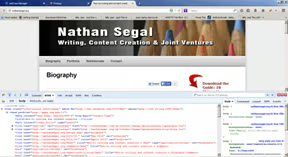
Firebug allows you to view the code on a website, study it, and make changes which you can view in real time. After that, you can copy the code and use it in your own projects or to update pages with trouble spots.
Additional Tools
Here are some additional CSS3 tools to aid in your explorations. They will also save you a lot of time.
Conclusion
As you can see, there are many CSS options available to you. Some are designed for use within a style sheet while others can be used on-the-fly. That’s the beauty of CSS and is just one of many reasons why it is so popular.
