


Handling Errors when Processing WP_Ajax_Response XML Data
A short time ago, I wrote how to deliver an XML response to the browser using WordPress’s built-in WP_Ajax_Response object. In that article, called Serve Up XML Using WP_Ajax_Response, we saw how to generate an XML-formatted response using the WP_Ajax_Response object, as well as how to parse the response on the client-side. In today’s follow up, we’ll learn how to adeptly handle errors using the WP_Ajax_Response’s counterpart, the WP_Error object.
Setting the WP_Ajax_Response Array ID
As we saw in the Serve Up XML Using WP_Ajax_Response article, the WP_Ajax_Response accepts a special array/object that contains all of the details to send back to the client. One of these details, the id, is a multi-purpose attribute that may either contain an integer or a WP_Error object. The former is useful if you only want to check for success or failure. Typically, 1 represents success and 0 is a failure. In the event of an error condition, the data could be utilized to display HTML-formatted information about the error to the client:
$response = array(
   'what'=>'error',
   'action'=>'show_menu',
   'id'=>0,
   'data'=>"<p class="error">Couldn't fetch the menu!</p>"
);
$xmlResponse = new WP_Ajax_Response($response);
$xmlResponse->send();
Once you go beyond a binary id of 0 or 1, there’s no point in using numeric ids because at that point you’d be emulating the old-style error code conventions. The more modern way to handle a collection of errors is to store each in its own object. In WordPress, the WP_Error object manages the entire collection of errors. The $errors property contains a list of errors, while the $error_data stores a data list for each error code.
Instantiating the WP_Error
Although not required, you can pass the code, message, and data directly to the constructor. If the $code parameter is empty, the other parameters will be ignored. Otherwise, the message will be used even if it is empty, but the data parameter will be used only if it is not empty. Here’s some code that creates a new WP_Error with the code and message:
$response = array(
   'what'=>'error',
   'action'=>'show_menu',
   'id'=>new WP_Error('menu_not_found', "Couldn't find the menu.")
);
$xmlResponse = new WP_Ajax_Response($response);
$xmlResponse->send();
The XML output produced by the above code shows how the various parameters are inserted into the output:
<?xml version='1.0' standalone='yes'?>
<wp_ajax>
   <response action='show_menu_0'>
      <error id='0' position='1'>
         <wp_error code='menu_not_found'><![CDATA[Couldn't find the menu.]]></wp_error>
         <supplemental></supplemental>
      </error>
   </response>
</wp_ajax>Assigning Multiple Messages
Multiple messages may be assigned to the same code but only one error data object may be associated with one code. Messages are added using the add() method, while data is associated with an error code using the add_data() function:
//Creating instance of error class
$error = new WP_Error( 'menu_not_found', 'Menu not found.', 'Menu Data' );

//Add new error message to object
$error->add( 'parsing_error', 'Not able to parse menu.' );

//Add error data to error code
//Note that get_line_number() is a user function and NOT part of the WP_Error object
$error->add_data( 'Parsing error at line ' . get_line_number(), 'parsing_error' );
The add() method is particularly useful for appending validation errors:
$errors = new WP_Error();

if ( empty( $firstname ) )
    $errors->add( 'firstname', 'You must fill out a first name.' );

if ( empty( $lastname ) )
    $errors->add( 'lastname', 'You must fill out a last name.' );

if ( empty( $username ) )
    $errors->add( 'username', 'You must fill out a user name.' );

if ( empty( $email ) )
    $errors->add( 'email', 'You must fill out an e-mail address.' );
Testing for Errors
Once processing has completed, the WP_Ajax_Response array can be tailored for an error or success condition based on the presence of errors in the WP_Error object.
$xml_response = new WP_Ajax_Response();
//...
//If required fields aren't filled out, send response
if ( count( $errors->get_error_codes() ) > 0 ) {
    $xml_response->add(array(
        'what' => 'errors',
        'id' => $errors
    ));
}
else {
    $xml_response->add(array(
        'what'=>'menusXML',
        'action'=>'show_menu',
        'id'=>'1',
        // 'data'=>'', no html
        'supplemental'=>$xml_data
    ));

}
$xml_response->send();
exit;
Testing for Errors on the Client
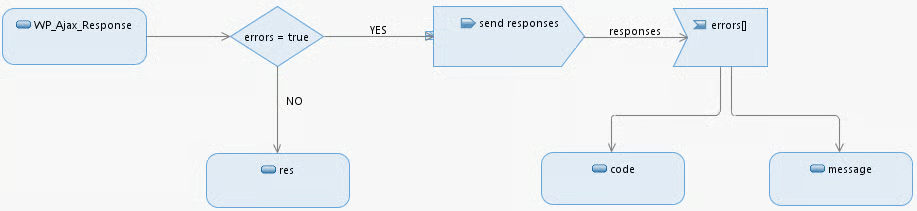
The parseAjaxResponse() method of the wpAjax object returns an array of responses passed from the WP_Ajax_Response class. If there are any errors present, the errors attribute is set to true so that all processing of the responses array can be geared towards working with error data:
    var responseArray = wpAjax.parseAjaxResponse(data, 'ajax-response');
    if (responseArray.errors) {
        $.each( responseArray.responses, function() {
          //display errors
        });
    }
    else {
        $.each( responseArray.responses, function() {
          //display data
        });
    }
}The following diagram shows Error handling by the WP_Ajax_Response object:
Conclusion
Error handling is essential when working with XML data and the WP_Error object is the ideal mechanism for incorporating thorough error handling in your WordPress-driven Web applications.
