written by Jennifer Marsman
Develop with HTML5 While Retaining Support for Older Browsers
We’ve discussed a lot of cool new functionality in HTML5, including the new semantic elements, the canvas tag for drawing, and the audio and video support.
You may think that this stuff is really cool, but you can’t possibly adopt HTML5 when many of your users don’t have HTML5-compatible browsers yet. Not to mention that the browsers that DO support HTML5 support different pieces of it; not all of the new HTML5 functionality is supported in all browsers and various features may be implemented differently.
But there is a way to use the new features without breaking your site for users with older browsers. You can use polyfills.
According to Paul Irish, a polyfill is “a shim that mimics a future API, providing fallback functionality to older browsers.” A polyfill fills in the gaps in older browsers that don’t support the HTML5 functionality in your site. Learning to use polyfills will let you use HTML5 today without leaving behind users of older browsers.
One way to get polyfill support is the JavaScript library Modernizr (but there are many polyfills available). Modernizr adds feature detection capability so you can check specifically for whether a browser supports (for example) the canvas element and provide a backup option if it doesn’t.
Let’s walk through an example. Remember the code sample that I used when introducing semantic elements and page layout? Here it is again:
<!DOCTYPE html>
<html>
<head>
    <meta charset="utf-8" />
    <title>Title</title>
    <link href="css/html5reset.css" rel="stylesheet" />
    <link href="css/style.css" rel="stylesheet" />
</head>
<body>
    <header>
        <hgroup>
            <h1>Header in h1</h1>
            <h2>Subheader in h2</h2>
        </hgroup>
    </header>
    <nav>
        <ul>
            <li><a href="#">Menu Option 1</a></li>
            <li><a href="#">Menu Option 2</a></li>
            <li><a href="#">Menu Option 3</a></li>
        </ul>
    </nav>
    <section>
        <article>
            <header>
                <h1>Article #1</h1>
            </header>
            <section>
                This is the first article.  This is <mark>highlighted</mark>.
            </section>
        </article>
        <article>
            <header>
                <h1>Article #2</h1>
            </header>
            <section>
                This is the second article.  These articles could be blog posts, etc.
            </section>
        </article>
    </section>
    <aside>
        <section>
            <h1>Links</h1>
            <ul>
                <li><a href="#">Link 1</a></li>
                <li><a href="#">Link 2</a></li>
                <li><a href="#">Link 3</a></li>
            </ul>
        </section>
        <figure>
            <img width="85" height="85"
                src="http://www.windowsdevbootcamp.com/Images/JennMar.jpg"
                alt="Jennifer Marsman" />
            <figcaption>Jennifer Marsman</figcaption>
        </figure>
    </aside>
    <footer>Footer - Copyright 2011</footer>
</body>
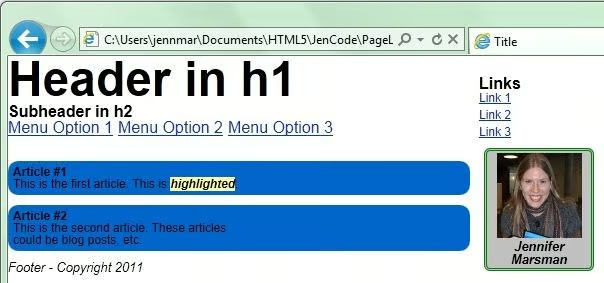
</html>This code contains a number of new HTML5 elements that aren’t supported in older browsers. Remember, in Internet Explorer 9, it looked like this:
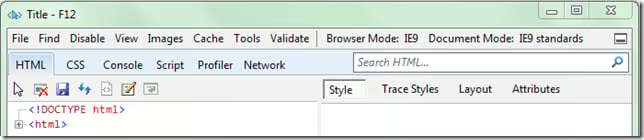
We can use the Internet Explorer developer tools to see what this would look like in older versions of IE. In Internet Explorer, press F12 to access the developer tools.
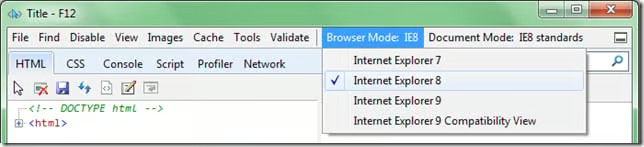
Note that the Browser Mode (in the grey menu bar across the top) is currently set to IE9. Click on the Browser Mode, and from the resulting dropdown menu, select “Internet Explorer 8” (which does not have HTML5 support).
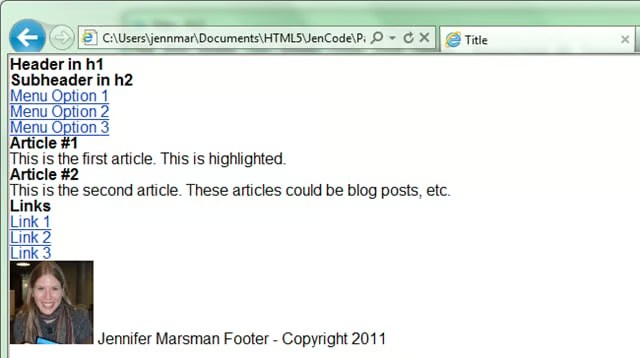
After I make this change and switch to a non-HTML5-compatible browser, this is what my webpage looks like: