Using the done() Method in Your Jasmine-driven Asynchronous JavaScript Tests
6/19/13
Jasmine.Async is an add-on library for Jasmine that provides additional functionality to do asynchronous testing. Modeled after Mocha’s async test support, it brings the done() function to the Jasmine unit testing environment. In today’s article, we’ll learn how the Jasmine.Async library makes your asynchronous process tests easier to write.
A Little History
Derick Bailey, the Jasmine.Async author, is a big fan of Jasmine, but noticed that making Jasmine work with asynchronous JavaScript was less than ideal. In particular, he didn’t like how runs() and waitsFor() calls were repeated every time you needed to wait for an asynchronous process to complete.
Thus, the Jasmine.Async library was born by borrowing Mocha’s use of the done() when the asynchronous code has completed.
How It Works
In my Test Asynchronous Methods Using the Jasmine runs() and waitFor() Methods article, I discussed the Jasmine runs() and waitFor() methods, which were created especially for the purpose of the practical implementation of asynchronous processes such as Ajax. Nonetheless, the runs() and waitFor() methods are equally adept at testing simulated asynchronous calls using the setTimeout(),setInterval(), or various event handlers.
Case in point, the following test employs setTimeout() to create an asynchronous event that takes 500 milliseconds to complete. An initial runs() call sets the default variables and makes the call to setTimeout(). Then the waitsFor() method causes intermittently returns the value of a flag to the Jasmine framework so that it knows when to continue execution of the test. Once the flag has been set to true, the second runs() method verifies our expectations:
describe("async tests", function(){
 var flag, value;
 it("should simulate an asynchronous call", function () {
  runs(function() {
    flag  = false;
    value = 0;

    setTimeout(function() {
      value++;
      flag = true;
    }, 500);
  });

  waitsFor(function() {
    return flag;
  }, "The Value should be incremented", 5000);

  runs(function() {
    expect(flag).toEqual(true);
    expect(value).toEqual(1);
  });
 });
});
Contrast the above test to the equivalent one below, using the Jasmine.Async library:
describe("async tests", function(){
var flag,
value,
async = new AsyncSpec(this);
async.beforeEach(function(done){
flag = false;
value = 0;
setTimeout(function(){
flag = true;
value++;
done();
}, 500);
});
async.it("should simulate an asynchronous call", function(){
expect(flag).toBe(true);
expect(value).toEqual(1);
});
});
The primary feature of the Jasmine.Async test is the call to the done() function that tells Jasmine that the process has completed. This approach negates the need for the waitsFor() method. In Mocha, if the process hasn’t come back done or failed an assertion in a certain amount of time (the default is 2000ms), the test fails. Jasmine.Async relies on Jasmine’s timeout of 5 seconds, as the following error confirms:
timeout: timed out after 5000 msec waiting for something to happen
Multiple Asynchronous Operations
You can include as many asynchronous operations as you wish, so long as you always call the done() method afterwards. The assertions won’t run until all of the processes have come back or timed out:
function doSomething() {
console.log('doSomething()...');
}
function doSomethingElse() {
console.log('doSomethingElse()...');
}
describe("an async spec", function(){
var async = new AsyncSpec(this);
async.beforeEach(function(done){
console.log('beforeEach()...');
doSomething();
setTimeout(function(){
doSomethingElse();
done();
}, 1000);
});
async.afterEach(function(done){
setTimeout(function(){
done();
console.log('afterEach()');
}, 1000);
});
async.it("did stuff", function(done){
setTimeout(function(){
expect(1).toBe(1);
done();
console.log( 'done.' );
}, 1000);
});
});
Outputting some text to the console helps verify that each timeout() call is taking about one second each. Notice that even the assertion has a timeout!

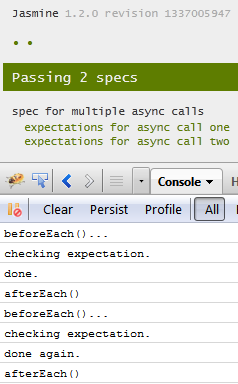
Let’s take things a step further by introducing an additional expectation. That will cause the beforeEach() and afterEach() to fire twice – once for each expectation – as well as perform an extra increment operation on the value variable. Here’s the code:
describe("spec for multiple async calls", function(){
var value = 0,
async = new AsyncSpec(this);
async.beforeEach(function(done){
setTimeout(function(){
console.log( 'beforeEach()...');
value++;
done();
}, 1000);
});
async.afterEach(function(done){
setTimeout(function(){
done();
console.log( 'afterEach()');
}, 1000);
});
async.it("expectations for async call one", function(done){
setTimeout(function(){
console.log( 'checking expectation.' );
expect(value).toEqual(1);
done();
console.log( 'done.' );
}, 1000);
});
async.it("expectations for async call two", function(done){
setTimeout(function(){
console.log( 'checking expectation.' );
expect(value).toEqual(2);
done();
console.log( 'done again.' );
}, 1000);
});
});
Thanks to the console.log() calls, we can see exactly what occurred during the test run:
Conclusion
The Jasmine.Async library adds the goodness of Mocha’s done() method to your asynchronous process tests. Use the jasmine.async.js file in development and jasmine.async.min.js in your production environment. The latter is a mere 1 KB! Just drop the appropriate script file in the same folder as your Jasmine scripts and link to it in your Test Runner HTML page.


