


| Excerpted from JavaScript for Programmers. By Paul J. Deitel, Harvey M. Deitel. ISBN: ISBN-10: 0137001312, ISBN-13: 978-0137001316, Copyright 2009. Used with the permission of InformIt. |  |
|---|
Registering Event Handlers
Functions that handle events are called event handlers.
Assigning an event handler to an event on a DOM node is
called registering an event handler. Previously, we have
registered event handlers using the inline model, treating
events as attributes of XHTML elements (e.g., <PONCLICK=”myfunction()”>). Another model, known as
the traditional model, for registering event handlers is
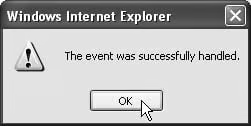
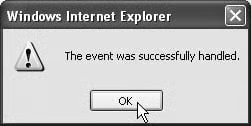
demonstrated alongside the inline model in Fig. 11.1.
   1   <?xml version = “1.0” encoding = “utf-8”?>
   2   <!DOCTYPE html PUBLIC “-//W3C//DTD XHTML 1.0 Strict//EN”
   3      “http://www.w3.org/TR/xhtml1/DTD/xhtml1-strict.dtd”>
   4
   5   <!– Fig. 11.1: registering.html –>
   6   <!– Event registration models. –>
   7   <html >
   8      <head>
   9         <title>Event Registration Models</title>
  10         <style type = “text/css”>
  11            div { padding: 5px;
  12                  margin: 10px;
  13                  border: 3px solid #0000BB;
  14                  width: 12em }
  15         </style>
  16         <script type = “text/javascript”>
  17            <!–
  18            // handle the onclick event regardless of how it was registered
  19            function handleEvent()
  20            {
  21               alert( “The event was successfully handled.” );
  22            } // end function handleEvent
  23
  24            // register the handler using the traditional model
  25            function registerHandler()
  26            {
  27               var traditional = document.getElementById( “traditional” );
  28               traditional.onclick = handleEvent;
  29            } // end function registerHandler
  30            // –>
  31         </script>
  32      </head>
  33      <body onload = “registerHandler()”>
  34         <!– The event handler is registered inline –>
  35         <div id = “inline” onclick = “handleEvent()”>
  36            Inline registration model</div>
  37
  38         <!– The event handler is registered by function registerHandler –>
  39         <div id = “traditional”>Traditional registration model</div>
  40      </body>
  41   </html>
Event registration models


In the earliest event-capable browsers, the inline model was the only way to handle events. Later, Netscape developed the traditional model and Internet Explorer adopted it. Since then, both Netscape and Microsoft have developed separate (incompatible) advanced event models with more functionality than either the inline or the traditional model. Netscape’s advanced model was adapted by the W3C to create a DOM Events Specification. Most browsers support the W3C model, but Internet Explorer 7 does not. This means that to create cross-browser websites, we are mostly limited to the traditional and inline event models. While the advanced models provide more convenience and functionality, most of the features can be implemented with the traditional model.
Line 35 assigns “handleEvent()” to the onclick attribute of the div in lines 35–36. This is the inline model for event registration we’ve seen in previous examples. The div in line 39 is assigned an event handler using the traditional model. When the body element (lines 33–40) loads, the registerHandler function is called.
Function registerHandler (lines 25–29) uses JavaScript to register the function handleEvent as the event handler for the onclick event of the div with the id “traditional”. Line 27 gets the div, and line 28 assigns the function handleEvent to the div’s onclick property.
