


written by Aaron Prenot
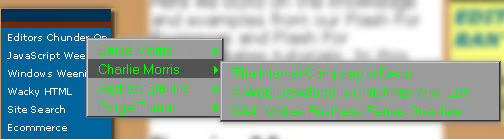
The Start menu is hierarchal, and since Web sites often have a similar hierarchal arrangement of pages, they suit cascading navigation menus very well. Here is a script that will allow you to create cascading menus in Internet Explorer 4.0 and above, and can be adapted for your own use without knowledge of JavaScript. It will allow your visitors to navigate your site with ease.
Best of all, if any other browser is used, the cascade won’t show but remains neutral. It won’t interfere with the normal navigation links on the page, so in this case your visitor can follow a normal hyperlink that’s in exactly the same place as the cascade.
Elements
There are three parts to this program. One is the core JavaScript file, HMenu.js, which contains all the difficult code. The second is the stylesheet file, HMenu.css. Both these files need to be placed in the same directory as the HTML file that uses the cascading menu. You can download them using Save Target/Link As on these links to Hmenu.js and Hmenu.css, or alternatively download them in zip format from here.
The third element is code that goes in the HTML file itself, and this you’ll need to modify to contain the links and descriptions for your specific cascading menu. It’s referred to as The Container.
The Container
This code within your HTML page is a Div element called “menuContainer”. It doesn’t matter where on the page you put this container, but it can only appear once, even if there are multiple cascading menus. It’s here that you put your menu definitions that tell the script what will go inside your menus. It should look like this:
<div id=”menuContainer”>
<div … some menu definitions
</div>
The Menu Definition
So now we need to define a menu. We’ll use a page from the Web Developer’s Journal as an example, the editor’s page, otherwise known as The Editors Chunder On. It’s one of the options from the navigation menu at the top left of every page, including this one.
The start of the menu definition looks like this:
<div id=”menuContainer”>
<div id=”menu1″ class=”menu”>
</div>
</div>
It’s possible to create more than one menu on a page, so first of all we need define which menu we’re dealing with. In this case there’s only one, but we still need to define it. To do that we create another Div element within the first.
A menu name is the word “menu”, followed by the number of the menu. Here we have only only one menu, so of course the menu number is 1. The menu name goes into the id= part of the div tag.
Then we add a standard class=”menu” part, and a closing tag. To add another menu you would just duplicate this with the number changed to 2 in the id.
Menu container with two menus:
<div id=”menuContainer”>
<div id=”menu1″ class=”menu”>
</div>
<div id=”menu2″ class=”menu”>
</div>
</div>
Menu Items
Now we have the menu defined, let’s add some items.
<div id=”menuContainer”>
<div id=”menu1″ class=”menu”>
<div id=”subMenu1_1″ class=”menuItem”><a href=”/hubs/prophub.html”>Propheads</a></div>
<div id=”subMenu1_2″ class=”menuItem”><a href=”/hubs/ponyhub.html”>Ponytails</a></div>
<div id=”subMenu1_3″ class=”menuItem”><a href=”/hubs/suithub.html”>Suits</a></div>
<div id=”subMenu1_4″ class=”menuItem”><a href=”/bios/pturner.html”>Paige Turner</a></div>
</div>
</div>
Here we have created four submenu items, and later we’ll define separate menus for each of these. Each item is defined by a starting and ending div tag. The submenu item names, or id’s, start with subMenu followed by the number of the menu they are inside (in this case 1) and then the number of the item.
If we wanted to add another item, its id would be subMenu1_5: the 1 for menu1, and the 5 for being item 5.
The rest of the tag is the same for all submenu items: class=”menuItem” plus the closing div tag.
Between the opening and closing div tags you put the name of the subtopic. Here, each submenu is the name of an editor. You can make this a link, as shown in the example, but you don’t have to. It can be plain text if all the links are in the next level of the cascade.
The Finished Product
Now that we have the Editors’ groups defined, we need to create menus for each editor, this is the next level.
These menu items are defined exactly the same as a submenu items, except that subMenu in the id is replaced with menuItem and the id is a little longer because we’ve added a level.
<div id=”menuContainer”>
<div id=”menu1″ class=”menu”>
<div id=”subMenu1_1″ class=”menuItem”><a href=”http://brucemorris.com”>Bruce Morris</a></div>
<div id=”menu1_1″ class=”menu”>
<div id=”menuItem1_1_1″ class=”menuItem”><a href=”/columns/pointy-haired_boss.html”>The Dotcom Pointy-haired Boss Syndrome</a></div>
<div id=”menuItem1_1_2″ class=”menuItem”><a href=”/columns/napster_pull_your_pants_up.html”>Hey Napster Fans…</a></div>
<div id=”menuItem1_1_3″ class=”menuItem”><a href=”/articles/skills_shortage.html”>What Internet Skills Shortage?</a></div>
</div>
<div id=”subMenu1_2″ class=”menuItem”><a href=”/hubs/ponyhub.html”>Ponytails</a></div>
<div id=”menu1_2″ class=”menu”>
<div id=”menuItem1_2_1″ class=”menuItem”><a href=”/columns/internet_company_is_dead.html”>The Internet Company is Dead</a></div>
<div id=”menuItem1_2_2″ class=”menuItem”><a href=”/columns/xmas_wish_list.html”>A Web Developer’s Christmas Wish List</a></div>
<div id=”menuItem1_2_3″ class=”menuItem”><a href=”/columns/business_sense.html”>Web Makes Business Sense Obsolete</a></div>
</div>
<div id=”subMenu1_3″ class=”menuItem”><a href=”/hubs/ponyhub.html”>Andrew Starling</a></div>
<div id=”menu1_3″ class=”menu”>
<div id=”menuItem1_3_1″ class=”menuItem”><a href=”/columns/ajs_domain_vacant.html”>Domain Vacant</a></div>
<div id=”menuItem1_3_2″ class=”menuItem”><a href=”/columns/ajs_navigation.html”>Navigation – What’s On Your Visitor’s Mind?</a></div>
<div id=”menuItem1_3_3″ class=”menuItem”><a href=”/columns/ajs_tabloid_tv.html”>The Web Meets TV – It’s Tabloid Time</a></div>
</div>
<div id=”subMenu1_4″ class=”menuItem”><a href=”/bios/pturner.html”>Paige Turner</a></div>
<div id=”menu1_4″ class=”menu”>
<div id=”menuItem1_4_1″ class=”menuItem”><a href=”/columns/sell_ads.html”>We’ll Make Money Selling Ads On the Site!</a></div>
<div id=”menuItem1_4_2″ class=”menuItem”><a href=”/columns/banner_ads_not_worth_it.html”>Banner Ads Aren’t Worth It</a></div>
<div id=”menuItem1_4_3″ class=”menuItem”><a href=”/articles/chaos_not_good.html”>Chaos is Not a Symptom of a Healthy Start-up</a></div>
</div>
</div>
</div>
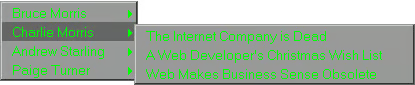
Here’s the finished item
Menu Numbering
Let’s look in more detail at the first of the new lines added there.
<div id=”menuItem1_1_1″ class=”menuItem”><a href=”/columns/pointy-haired_boss.html”>The Dotcom Pointy-haired Boss Syndrome</a></div>
We’ve got three levels so there are three parts to the menuItem id: the menu number, submenu number and item number. This is the first item, so the id takes the number 1_1_1. The second takes 1_1_2.
Attaching The Other Files
To get your HTML file to recognize the associated files in the same directory, add the following code in the Head section. This is standard and doesn’t need to be adapted.
<html>
<head>
<title>Your page</title>
<script language=”JavaScript” src=”HMenu.js”></script>
<link rel=”stylesheet” href=”HMenu.css”>
</head>
If you have another stylesheet in the Head, the cascade stylesheet must be the last one
You also need to change the document’s body tag to load the initialization function for the menus.
<body onload=”initMenu()”>
Applying the Menus
Finally we need to connect the cascading menus to something on the page.
If we already have a hyperlink to The Editor’s Chunder On, all we do is add the menu to that link.
<a href=”/hubs/edithub.html” menu=menu1>The Editors Chunder On</a>
Similar connections can be made to pictures and table cells.
For example:
<img src=”main_top.jpg” menu=menu3>
<td menu=menu2>Brands of Shampoo</td>
Just add menu=menu# into the tag, replacing the # with the number of the menu.
If the user is using IE4 or better then your menu will show up, but if they are using any other browser the default action will take place, taking them to a new page if it’s a hyperlink.
You can create as many menus as you like, and place them anywhere on the page, as long as you keep all the definitions in one container.
A Step Further
There is a lot more you can do with this script. You can have an element on your page display any submenu. Using the example above, if we wanted to show only the Andrew Starling menu (menu1_3), we would just put menu=menu1_3 into the relevant tag.
<a href=”/hubs/ponyhub.html” menu=menu1_3>Andrew Starling</a>
Also you can have as many submenus as you want. You can have submenus inside submenus inside submenus. Just remember to create all the necessary menus. Here is a simple example.
<div id=”menuContainer”>
<div id=”menu1″ class=”menu”>
<div id=”subMenu1_1″ class=”menuItem”><a href=”/hair/index.html”>Hair Products</a></div>
<div id=”menu1_1″ class=”menu”>
<div id=”menuItem1_1_1″ class=”menuItem”><a href=”/hair/shampoo.html”>Shampoo</a></div>
<div id=”menuItem1_1_2″ class=”menuItem”><a href=”/hair/gel.html”>Gel</a></div>
</div>
<div id=”subMenu1_2″ class=”menuItem”><a href=”/skin/index.html”>Skin Care Products</a></div>
<div id=”menu1_2″ class=”menu”>
<div id=”menuItem1_2_1″ class=”menuItem”><a href=”/skin/lotion.html”>Lotions</a></div>
<div id=”subMenu1_2_2″ class=”menuItem”><a href=”/skin/ointments/index.html”>Ointments</a></div>
<div id=”menu1_2_2″ class=”menu”>
<div id=”menuItem1_2_2_1″ class=”menuItem”><a href=”/skin/ointments/bengay.html”>Ben-Gay</a></div>
<div id=”menuItem1_2_2_2″ class=”menuItem”><a href=”/skin/ointments/icyhot.html”>Icy Hot</a></div>
<div id=”menuItem1_2_2_3″ class=”menuItem”><a href=”/skin/ointments/burncream.html”>Burn Cream</a></div>
</div>
<div id=”menuItem1_2_3″ class=”menuItem”><a href=”/skin/powder.html”>Powder</a></div>
</div>
<div id=”menuItem1_3″ class=”menuItem”><a href=”/nailpolish.html”>Nail Polish</a></div>
</div>
</div>
And that’s it. Once you’re familiar with creating containers, you can reuse this script on lots of different pages and it should only take a few minutes to adapt.
This article originally appeared on WebDevelopersJournal.com.
