


David Catuhe
WebGL is clearly a hot topic nowadays. Apple has just announced the availability of WebGL for Safari (without having to struggle with options) and iOS 8. This allows web developers to create 3D web sites that can really be used everywhere.
The main drawback of WebGL is the inner complexity. You have to deal with a lot of plumbing because WebGL is a really powerful but extremely low level. So before being able to just draw a plain triangle you will have to deal with a huge amount of code.
This is why with some friends we decided to create a high level API on top of WebGL: Babylon.js. You can find it here: www.babylonjs.com

Simplicity is the foundation of Babylon.js, which is why we want for each required feature within the framework, to use a minimal amount of code, thus providing total simplicity within that tool.
Getting started
To deal with WebGL, we created a class called Engine. This engine will hide all the plumbing for you.
Once an engine is created, you will be able to create a scene which is the container of all entities implied in a 3D rendering:
- Lights: Define the light source
- Cameras: Define your point of view
- Meshes: They are the 3D objects
- Materials: Define how a 3D object is rendered
So based on this, here is the smallest piece of code you have to write to setup everything:
var canvas = document.getElementById(“canvas”);
// Check support
if (!BABYLON.Engine.isSupported()) {
window.alert(‘Browser not supported’);
} else {
// Babylon
var engine = new BABYLON.Engine(canvas, true);
var scene = new BABYLON.Scene(engine);
var camera = new BABYLON.ArcRotateCamera(“Camera”, 0, 0.8, 100, new BABYLON.Vector3.Zero(), scene);
camera.attachControl(canvas);
// Once the scene is created, just register a render loop to render it
engine.runRenderLoop(function () {
scene.render();
});
// Resize
window.addEventListener(“resize”, function () {
engine.resize();
});
}
I used an ArcRotateCamera which can be controlled with mouse, keyboard or touch. This camera rotates around a central point (which is (0, 0, 0)) here.
If you want to add an object you can use integrated primitives supported by Babylon.js:
// Check support
if (!BABYLON.Engine.isSupported()) {
window.alert(‘Browser not supported’);
} else {
// Babylon
var engine = new BABYLON.Engine(canvas, true);
var scene = new BABYLON.Scene(engine);
// Create a rotating camera
var camera = new BABYLON.ArcRotateCamera(“Camera”, 0, Math.PI / 2, 12, BABYLON.Vector3.Zero(), scene);
// Attach it to handle user inputs (keyboard, mouse, touch)
camera.attachControl(canvas, false);
// Add a light
var light = new BABYLON.HemisphericLight(“hemi”, new BABYLON.Vector3(0, 1, 0), scene);
// Create a builtin shape
var knot = BABYLON.Mesh.CreateTorusKnot(“mesh”, 2, 0.5, 128, 64, 2, 3, scene);
// Define a simple material
var material = new BABYLON.StandardMaterial(“std“, scene);
material.diffuseColor = new BABYLON.Color3(0.5, 0, 0.5);
knot.material = material;
// Once the scene is created, just register a render loop to render it
engine.runRenderLoop(function () {
scene.render();
});
// Resize
window.addEventListener(“resize”, function () {
engine.resize();
});
}
Easy, right? We create a light, a mesh (which is a torus knot) and a material to define the color of the mesh.
Tools
To help you learn Babylon.js we created a lot of resources.
First of all, you can go to the GitHub repo and fork / clone it to play directly with the sources: https://github.com/BabylonJS/Babylon.js
We also spend a lot of time updating the wiki to help you find information on all the features we add: https://github.com/BabylonJS/Babylon.js/wiki
On a more interactive way, you can play with the Playground where you can discover live examples of code or try to create yours: http://www.babylonjs.com/playground/
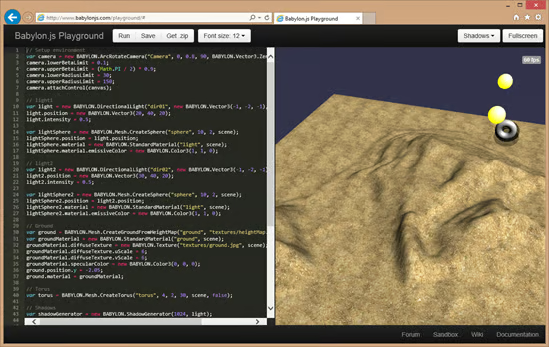
There is obviously a cool forum where you can ask questions or try to help other users: http://www.html5gamedevs.com/forum/16-babylonjs/
Creating assets
We saw how to use integrated primitives but if you want to go bigger you will need to work with a 3D designer to get more realistic scenes J
To do so, we created two exporters:
– One for 3ds Max which you can find here: https://github.com/BabylonJS/Babylon.js/tree/master/Exporters/3ds%20Max
– One for Blender3D: https://github.com/BabylonJS/Babylon.js/tree/master/Exporters/Blender
For people who only have access to .FBX or .OBJ files we developed an online converter that will generate .babylon for you: http://www.babylonjs.com/converter.html
To load a .babylon file produced with the previous tools, you just have a single line of code to call (as usualJ):
// Check support
if (!BABYLON.Engine.isSupported()) {
window.alert(‘Browser not supported’);
} else {
// Babylon
var engine = new BABYLON.Engine(canvas, true);
var scene = new BABYLON.Scene(engine);
//Adding a light
var light = new BABYLON.PointLight(“Omni”, new BABYLON.Vector3(20, 20, 100), scene);
//Adding an Arc Rotate Camera
var camera = new BABYLON.ArcRotateCamera(“Camera”, 0, 0.8, 100, new BABYLON.Vector3.Zero(), scene);
camera.attachControl(canvas, false);
// The first parameter can be used to specify which mesh to import. Here we import all meshes
BABYLON.SceneLoader.ImportMesh(“”, “scenes/”, “skull.babylon“, scene, function (newMeshes) {
// Set the target of the camera to the first imported mesh
camera.target = newMeshes[0];
});
// Once the scene is created, just register a render loop to render it
engine.runRenderLoop(function () {
scene.render();
});
// Resize
window.addEventListener(“resize”, function () {
engine.resize();
});
}
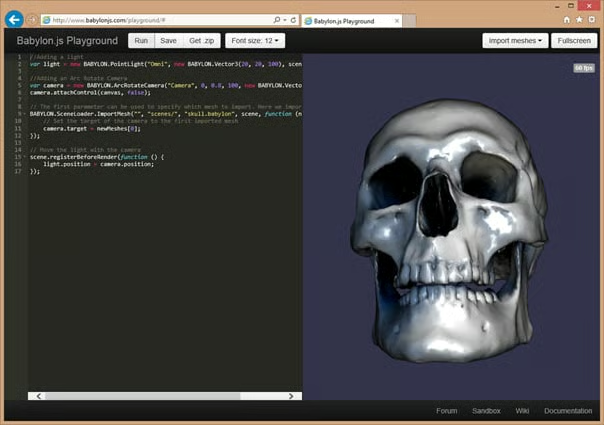
But you can even go simpler by using the sandbox: http://www.babylonjs.com/sandbox/. This tool allows you to drag’n’drop a .babylon file alongside textures and directly test it without having to setup a webserver.
Shaders
If you want to go even further, you can also considerate developing your own shaders to really change the way meshes are looking.
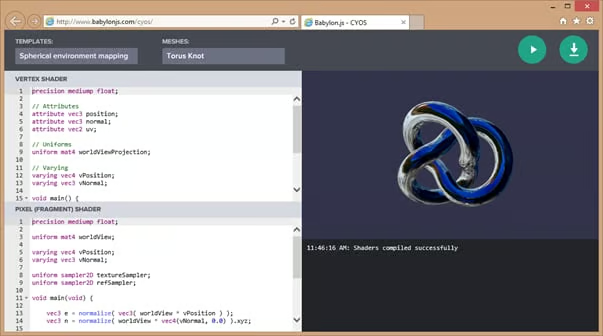
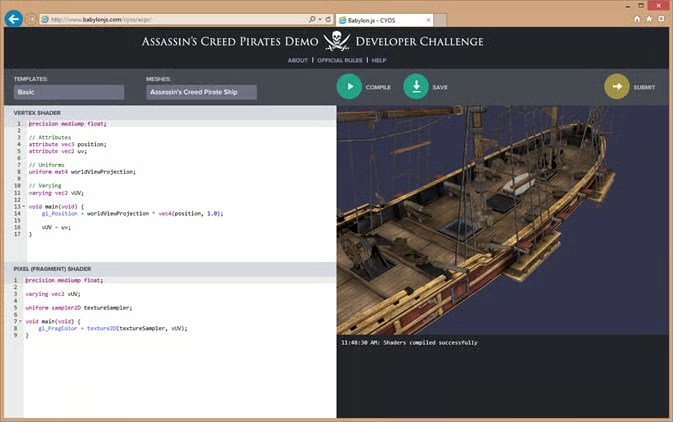
To help you, we created CYOS (Create your Own Shader): http://www.babylonjs.com/cyos/
Using this tool you can edit a couple of vertex and pixel shaders and directly see the result:
Conclusion
Using Babylon.js and all the associated tools, we will be able to create fantastic 3D worlds.
And you do not have to take my word for that. To prove it, just have a look at what Ubi Soft did with Babylon.js for Assassin’s Creed Pirate: http://race.assassinscreedpirates.com/
And you can even win an Xbox one by trying to create your own shader for the pirate ship: http://www.babylonjs.com/cyos/acpr/
Finally, if you want to know more about Babylon.js, here are some helpful links:
– http://blogs.msdn.com/b/eternalcoding/archive/2013/10/28/babylon-js-the-train-demo.aspx
