
If you have even a modest amount of jQuery experience, you probably noticed that there is a tendency for developers to code their event handlers as anonymous functions. The practice seems intuitive, because once a handler is assigned, you never have to refer to the function again. The drawback to this convention is that it makes testing your event handlers a lot harder. I alluded to that problem in the Testing HTML5 Web UIs with Jasmine-jQuery article. Then, the Loading External Fixtures with the Jasmine-jQuery Library article provided the first step in the solution by loading an entire web page using the jasmine-jquery library. This tutorial will pick up from where we left off and explain how to load the target script into our fixture and expose functions within jQuery.ready() so that we can test them.
Extracting the jQuery Document ready() Handler Body
While the jQuery Document ready() handler comes in different forms, it’s actually quite easy to access the anonymous function code because the function body is always contained within curly braces ({}).
//form 1:
$( document ).ready(function() {

});

//form 2:
$(function() {

});
So, if you have a DOM container such as a DIV or FORM, you can extract the script code by finding the SCRIPT element and then retrieving its HTML using the jQuery DOM html() method:
script = content.find('script').html()Don’t use text() because it replaces element-related characters with their corresponding character entities so that they display literally (i.e. the HTML will be displayed rather than rendered). This would be a problem for “<” and “>” characters as well as any tags that you generate dynamically within your script.
The following one-liner extracts the function body code from the jQuery $( document ).ready() handler:
scrBody = script.substring(script.indexOf("{") + 1, script.lastIndexOf("}"));Here then, is the updated code that fetches the external fixture page:
beforeAll(function(done) {
  $.get(
    "https://codepen.io/blackjacques/pen/Vydeyj.html",
    function(html) {
      // Success! Do stuff with data.
      var tempDom   = $('<output>').append($.parseHTML(html, null, true)),
          content   = tempDom.find('div#wpbody-content'),
          script    = content.find('script').remove(),
          scrCode   = script.html(),
          readyBody = scrCode.substring(scrCode.indexOf("{") + 1, scrCode.lastIndexOf("}"));

      //set the jasmine fixtures…
    }
  );
});In the browser’s DOM Explorer, we can see the elements produced by jasmine, including our fixture:
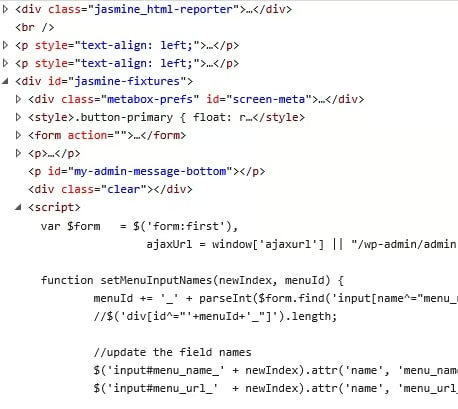
Setting the Test Fixtures
Now that we’ve got our content DIV and Document ready() code, we’re ready to assign them to jasmine.
As I’ve mentioned, part of the appeal of jasmine-jquery is its numerous fixture loading methods. In the Loading External Fixtures with the jasmine-jquery Library article we used the jasmine.getFixtures().set(html) method to load a fixture from an HTML string. This time we’ll employ the setFixtures(html) global shortcut, along with its appendSetFixtures(html) counterpart to load the content DIV and script respectively.
Both setFixtures() and appendSet() accept either a string or a jQuery element, so we can pass both elements directly to the functions.
setFixtures( content );
//the .html function sets the script body to the parsed code
appendSetFixtures( script.html(readyBody) );
Testing for Function Visibility
Having removed functions from the anonymous Document ready() handler, we should now be able to reference any and all functions contained therein. Global functions, like any JS data type, are appended to the global window namespace. Therefore, typeof window['functionName'] will evaluate to “function” if there is a global function by that name, or “undefined”, if there isn’t.
We don’t even need to use the typeof operator to test for a function’s existence because jasmine has a toBeDefined() (and a toBeUndefined()) matcher. We can however use it to test that the variable in question is in fact a function.
it ("Functions should be defined.", function() {
  expect(window['setMenuInputNames']).toBeDefined();
  expect(window['displayAdminMessage']).toBeDefined();
  expect(window['createLocationDiv']).toBeDefined();

  expect(typeof setMenuInputNames).toEqual('function');
  expect(typeof displayAdminMessage).toEqual('function');
  expect(typeof createLocationDiv).toEqual('function');

  //you can even check that event handlers are bound!
  expect('click' in $._data( $('#btnAddNewMenu').get(0), "events" ) ).toBe(true);
});Conclusion
All of the code presented here today is up on Codepen so you can try it out and see all the code at work. In the next instalment, we’ll put our script parsing technique to good use as we test the Save Button handler code introduced in the Testing HTML5 Web UIs with jasmine-jquery article. Reminiscent of the movie Inception, the process that we’re testing is three levels deep! The Document ready() handler contains the anonymous button click handler, which contains the Ajax success handler, which contains the code that we’re testing: code that moves some fields from the bottom to the top of the form.
