


By
Dariusz
Parys
Today’s web applications are put together a mesh up a new experiences into one experience. Think Twitter widgets showing the latest tweets about a product. Or Facebook comments discussing an article. Or even just integrated web pages through an IFRAME element. These experiences can increase security breaches to your site.
Don’t stress…there’s a new kid on the block to help you out: The HTML5 Sandbox. But before I get to that, let’s quickly review IFRAME element issues.
A black box
Embedding content with an IFRAME is like announcing a party publically on Facebook. You think you know who you invited, but really you have no idea who passed it on and who’ll show up.
The same is true for framing content. You know what you are referencing, but you have no clue how the site will evolve in the future. Content or functionality (or both) can change any time. Without you knowing…and without your approval.
Security concerns using iframe
Browsers handle pages that use IFRAME just like any other web page. Forms can be used to retrieve user input, scripts can be executed, the page can navigate within the browser window, and browser plugins can be executed. And just like the party crashers who get out of hand, you have no control what the hosted content will do.
There is one mechanism in place by default that prevents some kinds of attacks: the cross-domain policy.
Re-hosting content from another domain
If hosted content is coming from another domain, cross-domain policy comes into play and it prohibits the “foreign” content to access the parent’s document object model.
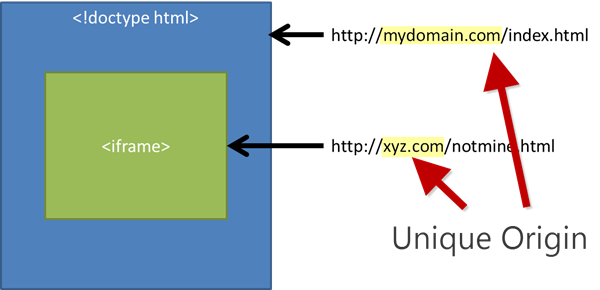
So, the embedded page is not able to read, for instance, cookies or the browser’s local storage for the hosted domain. But there are still risks left.
Hosted content can still re-navigate on the top level. By displaying content the user would expect, the site could attempt to phish confidential information from the user. Or, by using a similarly styled form, attempt to maliciously capture user information that way.
That’s why, even with the cross-domain policy in place, there are still big security risks.
Re-hosting content from the same domain
The case for re-hosting content from the same domain is even worse.
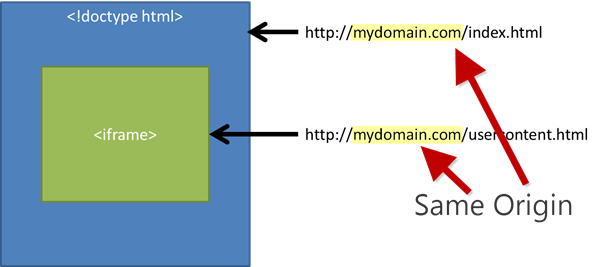
When the content comes from the same domain, there are no default security restrictions in place. Embedded content can access the complete loaded browser DOM and manipulate everything.
It kind of makes sense that content on the same domain should be safe. The risk here primarily stems from user-generated content that is re-hosted in the IFRAME.
A sandboxed approach
These valid security concerns hadn’t been properly addressed by a standards body for a long time. Without a clear W3C standard, it was essential to somehow secure the host from framed content. For example, Microsoft provided a proprietary implementation of IFRAME security in Internet Explorer 8. Others picked it up and discussed it as the baseline for their browsers as well. But standards have matured greatly since IE8.
Modern browsers including Chrome, Firefox, and IE10 Platform Preview are based on the W3C IFrame Sandbox Attribute.
Here’s what we’ll build today with Sandbox.

Let’s begin by applying the sandbox. Just add it as empty attribute to the IFRAME element:
<iframe sandbox src=”http://somewebsite.com/default.html”></iframe>
That’s it!
Now, IFRAME sandboxed content is re-hosted in the browser with the following restrictions:
- Plugins are disabled. Any kind of ActiveX, Flash, or Silverlight plugin will not be executed.
- Forms are disabled. The hosted content is not allowed to make forms post back to any target.
- Scripts are disabled. JavaScript is disabled and will not execute.
- Links to other browsing contexts are disabled. An anchor tag targeting different browser levels will not execute.
- Unique origin treatment. All content is treated under a unique origin. The content is not able to traverse the DOM or read cookie information.
This means that even content coming from the same domain is treated with the cross-domain policy, as each IFRAME content will be viewed as a unique origin.
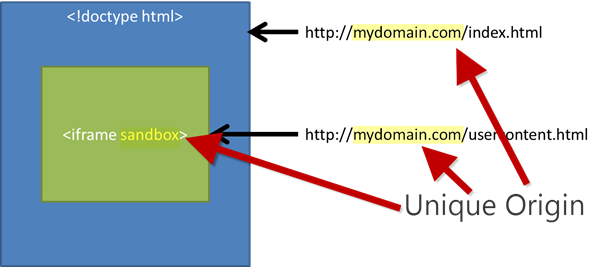
Embedded content is only permitted to display information. No other actions can be done inside the IFRAME that could compromise the hosting website or take advantage of the users’ trust.
Checking for the sandbox attribute
We know that an IFRAME is an open gate. We know that the sandbox attribute locks down security of hosted content. The decision is clear: Use IFRAME elements just with the sandbox attribute!
You can confirm that the browser supports the IFRAME sandbox attribute with a simple check in JavaScript:
if( “sandbox” in document.createElement( “IFRAME” ) ) {
// render the iframe element…
} else {
// embed content through other ways,
// as the browser does not support the sandbox
}
If it is supported, just use the sandbox attribute. If not, try to embed the content through other ways or encourage the user with a message that he should upgrade to a modern browser.
Customizing the Sandbox
There are cases where you’ll need some level of customization on the restrictions, which is absolutely possible.
Several attribute values relax the standard sandbox policy:
allow-forms
If you want to enable forms post back within the IFRAME element, you just specify the allow-forms value for the sandbox attribute.
<iframe sandbox=”allow-forms” src=”xyz.html”></iframe>
If this value is present, the embedded page is allowed to post back using a form submit within the frame.
allow-scripts
JavaScript is a powerful language and is often used to have dynamic interactions on the client side without resending information to the server. But that power also brings risks when re-hosting foreign web pages. Therefore, you should carefully consider whether you really want to enable JavaScript in IFRAME scenarios — especially when the content is from an unknown source.
Enabling JavaScript is done through the allow-scripts value.
<iframe sandbox=”allow-scripts” src=”xyz.html”></iframe>
allow-same-origin
By default, an IFRAME page from the same domain has the possibility to access the parent’s document object model.
With the sandbox attribute in place, the page will be treated as not being from the same origin. This page has no access to the resources, even when coming from the same domain.
To re-enable same-origin treatment in a sandboxed scenario, you have to specify the allow-same-origin attribute.
<iframe sandbox=”allow-same-origin” src=”xyz.html”></iframe>
The value itself is not very helpful, as you need some script capabilities to make use of it.
For example, if you want to access the local storage of the current domain like this:
function loadFromStorage( key ) {
if( localStorage ) {
return localStorage.getItem( key );
}
});
…you also need the allow-scripts value:
<iframe sandbox=”allow-scripts allow-same-origin” src=”xyz.html”></iframe>
Now access works!
But be warned: Allowing multiple scripts in the same sandbox can lead to security vulnerabilities. For example, your hosted content can manipulate the attributes of the sandbox and remove further restrictions.
allow-top-navigation
When you use the sandbox attribute, anchor targeting other browsing contexts are ignored and not executed by default. This protects the website hosting the IFRAME content from being replaced by the hosted content.
For example, this link would not be executed in the default sandbox, as the target would replace the complete web page:
<a href=”xyz.html” target=”_top”>Click me</a>
Relaxing this policy is only recommended if you trust the content you host.
<iframe sandbox=”allow-top-navigation” src=”xyz.html”></iframe>
ms-allow-popups
Sometimes it is useful to allow embedded content opening up new popup windows. A perfect example is a mapping service like Bing Maps.
When embedding Bing Maps, additional functionality like driving directions or destination details can be looked up in popup windows. But since sandbox prohibits this, there’s a setting in Internet Explorer 10 that will enable popups without compromising the sandbox.
The following code shows how to set up ms-allow-popups.
<iframe sandbox=”ms-allow-popups” src=”xyz.html”></iframe>
When setting this value, embedded sites are able to display information in a new window.
<a href=”xyz.html” target=”_new”>Show Info</a>
Putting it all together
You can combine several attribute values on one sandbox. For instance, if you want to enable forms post-back, top-level navigation and JavaScript, just specify
<iframe sandbox=”allow-forms allow-top-navigation allow-scripts” src=”xyz.html”></iframe>
It is also good to know that the sandbox behaves correctly when used in hierarchical situations, using several nested IFRAMES with different sandbox attribute values. The top-level sandbox always dominates down the hierarchy.
Get hands on!
You can play around with the HTML sandbox in this demo. And you can download a copy of this demo from Github. To enable the form post-back demo, just open the project folder in WebMatrix and start the project from there.
Then, download a modern browser (like Internet Explorer 10 Platform Preview) and get familiar with the sandbox by reading the IE developer guide. This single attribute is a big step toward a more secure web…and modern browsers are finally ready to sandbox embedded content.

Dariusz Parys is a developer evangelist at Microsoft Germany, doing web development with a strong focus on upcoming technologies. Currently he is writing a lot of JavaScript and HTML5. You can contact Dariusz through his blog kouder.net
This article was reprinted with permission from Microsoft Corporation. This site does business with Microsoft Corporation.
